Redirect Checker
Enter a web address to follow its redirects hop by hop and see where it really ends up.
How this check works: our server sends one ordinary GET request per redirect step (at most 10) to the public address you enter, the same request a browser would make, and shows you a short summary — status codes, selected response headers and, for robots.txt, the file itself (up to 64 KB). It never sends data on your behalf, never contacts private or internal addresses, and does not log or store what you type; results are cached for 10 minutes and each visitor can run 10 checks per minute.
Next step
When the redirects end where they should, keep a screenshot of what the final URL shows.
Enter a public URL to capture a tall page as one image, up to the free height limit.
Capture the final page →Popular tools
- Noindex CheckerEnter a URL and paste its source to see whether anything stops Google from indexing it.
- Organization Schema GeneratorFill in your organization's details to get Organization JSON-LD structured data.
- Sitemap Checker and ValidatorPaste a sitemap or open the file to check it against the sitemap protocol, with line numbers.
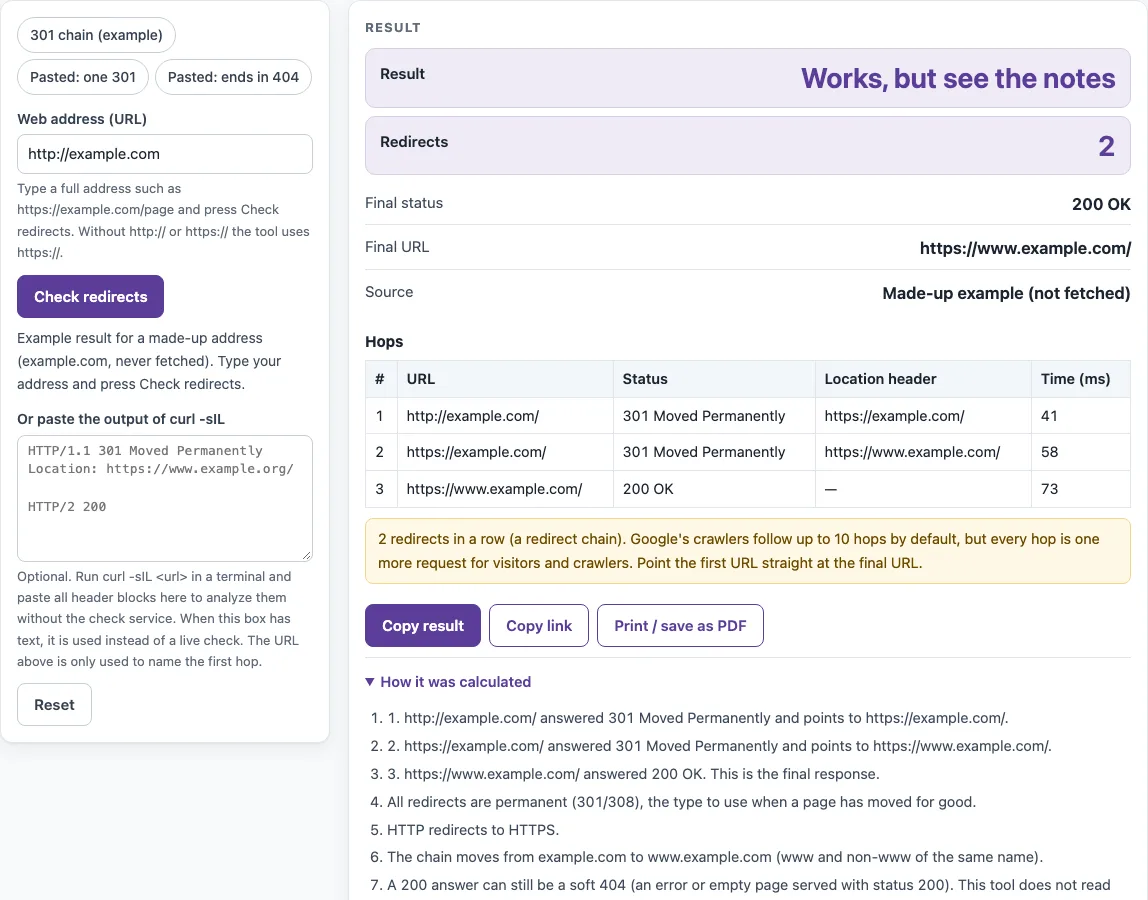
How to use the Redirect checker
- Open the page. The made-up example chain for example.com is shown, labelled “Made-up example (not fetched)”. Nothing is requested until you press the button.
- Type a web address in the “Web address (URL)” box. If you leave out the scheme, https:// is added.
- Press “Check redirects”. The service requests the address with GET and follows up to 10 hops, with 8 seconds per hop.
- Read the verdict in “Result”: “No problems found in this chain”, “Works, but see the notes”, or “Problem found”.
- Check “Redirects”, “Final status” (for example 200 OK), “Final URL”, and “Source”.
- Go through the Hops table. Its columns are #, URL, Status, Location header, and Time (ms).
- Read “How it was calculated” for each hop in words. Read the warnings for any problems.
- To check without a live request, paste the output of
curl -sIL <url>into “Or paste the output of curl -sIL”. When that box has text, it is used instead of a live check.
The presets “301 chain (example)”, “Pasted: one 301”, and “Pasted: ends in 404” load sample results you can compare with your own. Live checks are limited to 10 checks a minute per visitor. Results are cached for 10 minutes, and the page says when an answer is cached. If the check service is unavailable, the page says live checks are not available, and paste mode still works.
How do I check if a URL redirects?
A URL redirects when the server replies with a 3xx status code and a Location header that names another address. The redirect checker repeats this step for each hop until it reaches a response that is not a redirect, then reports that response as the final status.
Each hop appears as one row in the Hops table. The “Redirects” count is the number of redirect responses in the chain. Under the rules the tool applies, zero or one redirect is fine, and two or more trigger a “redirect chain” warning. The tool also flags loops, chains longer than 10 redirects, and checks that stop early because of a timeout, a failed connection, a missing DNS name, or a port other than 80 or 443.
The check is one GET request per hop, sent from the service rather than from your browser. Results can therefore differ from what a logged-in visitor or a phone sees, because user agents, location, and cookies can change the response. Redirects made in JavaScript may never be seen if rendering fails, according to Google’s 301 redirects documentation. Server-side redirects are the reliable kind.
Is my redirect a 301 or a 302?
Look at the Status column of the first hop. It shows the code and its name, such as 301 Moved Permanently or 302 Found.
According to the RFC 9110 section 15 status names, 301 Moved Permanently and 308 Permanent Redirect are permanent. 302 Found, 303 See Other, and 307 Temporary Redirect are temporary. The tool uses this split. If every redirect in the chain is permanent, it reports “All redirects are permanent.” If the chain mixes permanent and temporary codes, or uses only temporary codes, it shows a warning. The tool does not label other 3xx codes as permanent or temporary.
Google Search Central’s “Redirects and Google Search” page explains why the difference matters. For a permanent redirect, Google uses the redirect as a signal that the target should be the canonical URL. For a temporary redirect, the indexing pipeline does not use it as that signal, and the source page stays shown in results. Check the code you actually send, because a server setting can differ from what you intended.
Sources (checked 13 October 2026): RFC 9110 · Google Search Central
Worked examples
| Input | Result |
|---|---|
| http://example.com | 2 redirect(s), final status 200 OK |
| pasted curl output | 1 redirect(s), final status 200 OK |
| pasted curl output | 2 redirect(s), final status 404 Not Found |
| pasted curl output | 1 redirect(s), final status 200 OK |
Calculated by the tool above; open it with the same values to see each step.
Frequently asked questions
What is a redirect chain?
A redirect chain is several redirects in a row, such as A to B to C. Each hop is one more request for the visitor or crawler to make. Pointing A straight at C removes the middle step. Google’s redirect documentation does not say chains must be avoided, so treat shorter chains as a matter of fewer requests.
How many redirects does Google follow?
By default, Google’s crawlers follow up to 10 redirect hops. This tool also stops at 10 hops, and it reports a problem if a chain goes beyond that limit.
How do I test a redirect from the command line?
Run curl -sIL <url> in a terminal, copy the whole output, and paste it into “Or paste the output of curl -sIL”. The tool ignores 1xx blocks and resolves relative Location headers against the previous URL. Pasted text is processed in the browser and never sent.
How do I check a 404?
Enter the address. If the page returns 404 Not Found, that status appears as the “Final status”, and the tool adds a warning for the final 404. The tool cannot see soft 404s, which are pages that say “not found” but return a 200 status, because it never reads page content.
Will the result match what I see in my browser?
Not always. The check is one GET per hop from the service, not from your browser. User agent, location, and cookies can change the response, so compare results with a second check if something looks wrong.
Related tools
- Bulk redirect checker: use it when you have a list of addresses to check for redirects.
- Trailing slash checker: use it to see whether a URL with or without a closing slash leads to a different result.
- Broken link checker: use it to find links that end in errors such as 404.
- Canonical tag checker: use it to check which URL a page declares as its canonical version.
- Noindex checker: use it to check whether a page asks search engines not to index it.
- Sitemap finder: use it to locate the sitemap file for a site.