Bulk Redirect Checker
Paste a list of URLs, or old and new pairs, to check all their redirects in one run.
How this check works: our server sends one ordinary GET request per redirect step (at most 10) to the public address you enter, the same request a browser would make, and shows you a short summary — status codes, selected response headers and, for robots.txt, the file itself (up to 64 KB). It never sends data on your behalf, never contacts private or internal addresses, and does not log or store what you type; results are cached for 10 minutes and each visitor can run 10 checks per minute.
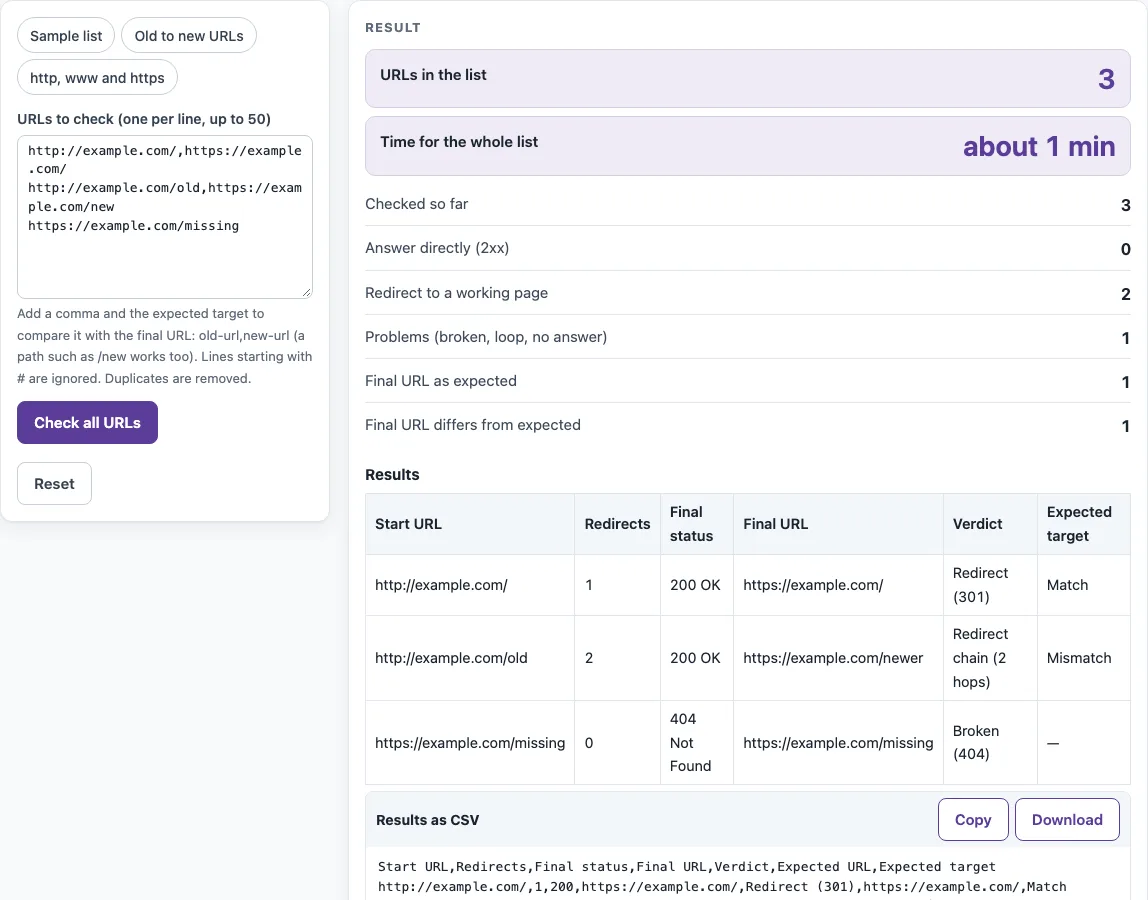
The bulk redirect checker checks up to 50 URLs in one run. For each URL it shows how many redirects it takes, the final status, the final URL and a verdict, so you can see which links redirect cleanly and which end on an error.
It is free and needs no sign-up. Each URL is checked by this site’s own read-only check service, using the same method as the single redirect checker. Only the web addresses you enter are sent to that service. The URLs are checked one after another, so a full list takes several minutes.
Use it to review a list of links, or after a site move to confirm that old URLs reach their new targets.
How to use the bulk redirect checker
- Click into the box labelled “URLs to check (one per line, up to 50)”.
- Type or paste one URL per line. If a line has no scheme, https:// is added. To compare a URL with an expected address, write
old,newon that line. - Optional: press a preset, “Sample list”, “Old to new URLs” or “http, www and https”, to fill the box with a ready-made list. Edit it if needed.
- Press “Check all URLs”. Watch the “Checking n of N” progress. If the page has to wait for the rate limit, a countdown appears.
- To end the run early, press “Stop”. Rows that were already checked stay in the table.
- Read the Results table: Start URL, Redirects, Final status, Final URL and Verdict. The Expected target column appears when any line has an expected URL.
- Check the summary rows: URLs in the list, Time for the whole list, Checked so far, Answer directly (2xx), Redirect to a working page, Problems (broken, loop, no answer), Final URL as expected and Final URL differs from expected.
- Press “Results as CSV” to copy the data, or download it as redirect-check.csv.
The page opens with a made-up sample (example.com) labelled as not fetched. Nothing is checked until you press “Check all URLs”. Lines starting with # and blank lines are ignored.
How can I check many redirects at once?
Paste up to 50 URLs, one per line, and press “Check all URLs”. The page works through the list one URL at a time, and each row shows the redirect count, final status, final URL and verdict.
Each verdict follows a fixed rule. A URL that answers 2xx directly gets OK (200). A single redirect gets Redirect (301). Two or more redirects that end on a 2xx page get Redirect chain (n hops). A final 4xx gets Broken (404), and a final 5xx gets Server error (503). Loops and URLs that need more than 10 hops get Redirect loop or Too many redirects. Each hop is a separate request, which is why chains are shown as chains. Google’s crawlers also follow up to 10 hops by default.
Can I compare old URLs with new ones?
Yes. Write each line as old,new, with the old address first and the expected new address second. The page follows the redirects from the old URL and compares the final URL with the expected one.
A Match means the final URL equals the expected URL exactly, ignoring any #fragment, and the URL ends on a 2xx page. Anything else is a Mismatch. A trailing-slash difference counts as a mismatch. The new value may be a path such as /new, which is resolved against the old URL. After a migration, look first for Mismatch, chain and 404 rows.
How long does it take?
About one minute per nine URLs. The check service allows 10 checks a minute per visitor, and the page starts at most nine in any 60 seconds. A list of n URLs therefore takes about ceil(n / 9) minutes, so 50 URLs take about six minutes. “Time for the whole list” in the summary shows the actual time. If the service answers “too many checks”, the page waits 60 seconds and retries once.
Why does a URL show “Could not check”?
It means the check did not get a usable answer, so no status can be reported. The reason follows the label, for example “Could not check: timeout”. Common causes are a timeout (8 seconds per hop), a DNS name that does not exist, a private or internal host, and an address the service refuses.
Only public addresses on ports 80 and 443 are checked. IP addresses and user:password@host forms are refused, and they appear as Could not check.
Sources (checked 13 October 2026): RFC 4180 · Google Search Central
Worked examples
| Input | Result |
|---|---|
| 3 URL(s) | about 1 min to check |
| 3 URL(s) | about 1 min to check |
| 2 URL(s) | about 1 min to check |
Calculated by the tool above; open it with the same values to see each step.
Frequently asked questions
Can I export the results?
Yes. Press “Results as CSV” to copy the table or download it as redirect-check.csv. The file follows RFC 4180, and cells that start with =, +, - or @ are protected so spreadsheets do not run them as formulas.
Does it check more than 50?
No. The maximum is 50 URLs, and duplicates are removed before the count. If you paste more, the rest is left out and a warning appears. To check a longer list, split it into batches of 50 and run them one after another.
Does the check read the page content?
No. The check service returns no page content, so it cannot detect soft 404s, where a “not found” message is shown with a 200 status. Such a page shows as OK because the status is 200.
Are the URLs I enter sent anywhere?
Only the web addresses you enter are sent, to this site’s own read-only check service. Results are cached for 10 minutes, and nothing is stored. The results describe the moment of the check, from the service’s network.
Does the table show whether a redirect is permanent?
No. Under Google Search Central guidance, 301 and 308 are permanent, and 302, 303 and 307 are temporary. The bulk table does not make that judgement, so open the single redirect checker for a URL when you need it.
Related tools
- Redirect checker - Use it to check one URL in detail, including whether a redirect is permanent or temporary.
- Trailing slash checker - Use it when a trailing-slash difference is causing a mismatch.
- Broken link checker - Use it when you are looking for broken links.
- Canonical tag checker - Use it when you want to check a page’s canonical tag.
- Noindex checker - Use it when you need to see whether a page carries a noindex directive.
- Sitemap finder - Use it when you need to locate a site’s sitemap.