Canonical Tag Checker
Enter a URL, paste its source, or both, to check which canonical URL the page declares.
How this check works: our server sends one ordinary GET request per redirect step (at most 10) to the public address you enter, the same request a browser would make, and shows you a short summary — status codes, selected response headers and, for robots.txt, the file itself (up to 64 KB). It never sends data on your behalf, never contacts private or internal addresses, and does not log or store what you type; results are cached for 10 minutes and each visitor can run 10 checks per minute.
rel="canonical" link element from page source you paste, or the Link header returned for an address you type, and reports the result in plain terms. Pasted source is processed in your browser and never sent anywhere. A live check sends only the web address you enter to this site’s own read-only check service, which allows 10 checks a minute and caches results for 10 minutes. The service never fetches page HTML and stores nothing. The tool is free and needs no sign-up. Use this canonical link checker before or after publishing changes to confirm that a page’s canonical points where you intend.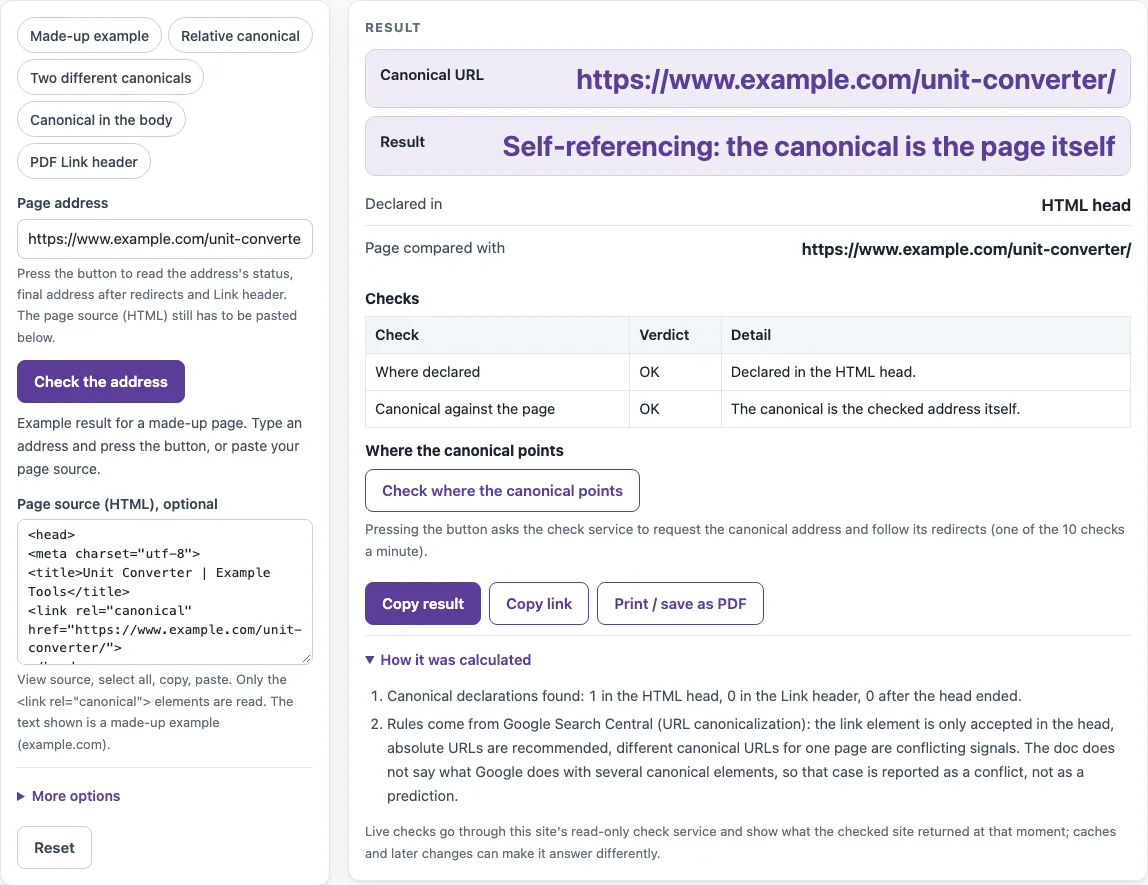
How to use the Canonical tag checker
- Type the page you want to check into Page address.
- Press Check the address. The service requests the address, follows up to 10 redirects, and returns the status, the final address and the Link response header. It never returns the HTML, so this mode checks only the Link header.
- To check the HTML element too, open the page in your browser, choose View source, copy the source, and paste it into Page source (HTML), optional. The limit is 3 million characters.
- If you need to change the header, open More options and edit Link header (filled by the check, or paste) by hand.
- Read Result and Declared in first. Then check Canonical URL, Page compared with and HTTP status of the page.
- Go through the Checks table to see each issue and its level.
- Press Check where the canonical points to have the service request the canonical address and follow its redirects. The result says whether that address answers directly, redirects or errors. This uses one more of your 10 checks a minute.
If you edit the address after a check, the results are ignored and the page tells you so, so run the check again. The chips Made-up example, Relative canonical, Two different canonicals, Canonical in the body and PDF Link header load sample cases you can use to see how each result looks.
How do I check a canonical tag?
A canonical tag is a <link rel="canonical" href="..."> element in the head of an HTML page. It names the address you prefer as the main version of that content. To check it, confirm that the page has one such element in the head, that its href resolves to a full address, and that the address is the one you want treated as the main version.
Should the canonical be absolute?
Yes, Google recommends absolute URLs, meaning full addresses with the scheme and host, such as https://www.example.com/guide/. Relative canonicals are supported but not recommended, so the tool marks them as Review. A relative value resolves against the <base href> if the page has one, otherwise against the final address of the checked page, otherwise against the typed full address.
What if a page has two canonical tags?
If both tags name the same URL, the tool reports Info. That is harmless, but you should remove the duplicate. If they name different URLs, the result is Conflicting canonicals, which is a Problem. Google advises against naming different URLs as canonical for the same page, and the documentation does not say which one Google would choose, so keep one. The same conflict applies between the HTML and the Link header.
Does a canonical in the body work?
No. Google accepts the rel="canonical" link element only in the head section of the HTML. A canonical placed after the head ends is reported as Ignored: it is outside the head. Move it into the head. The Link header is a separate signal and works for non-HTML files such as PDFs.
Should the canonical redirect?
It is better to point the canonical at the final address, not at an address that redirects. A redirect is a strong signal that its target should become canonical, so naming the target directly avoids the mismatch. Press Check where the canonical points to see whether the address answers directly (OK), redirects (Review) or returns an error (Problem). A canonical using http:// on an https:// page is also marked Review, because Google prefers HTTPS pages.
Sources (checked 13 October 2026): Google Search Central
Worked examples
| Input | Result |
|---|---|
| https://www.example.com/unit-converter/ | Self-referencing: the canonical is the page itself: https://www.example.com/unit-converter/ |
| https://www.example.com/unit-converter/?ref=nav | Points to a different address: https://www.example.com/unit-converter/ |
| https://www.example.com/a | Conflicting canonicals |
| https://example.org/post | Ignored: it is outside the head |
| <https://www.example.com/downloads/white-paper.pdf>; rel="canonical" | Canonical found, but there is no page address to compare it with: https://www.example.com/downloads/white-paper.pdf |
Calculated by the tool above; open it with the same values to see each step.
Frequently asked questions
Can the tool read the canonical from a URL alone?
Only from the Link header. An address check reads any rel="canonical" Link header the server returns, for example Link: <https://www.example.com/report.pdf>; rel="canonical". The HTML link element needs the pasted page source, because the check service never returns HTML.
Does every page need a canonical tag?
No. If you do not say which URL is canonical, Google chooses one itself. The tag is a way to state your preference when the same content can be reached at several addresses, for example with tracking parameters or with and without a trailing slash, so it helps most on pages that have such duplicates.
Can a canonical point to another domain?
Google’s documentation does not address this case, so the tool shows a canonical on another host as Info rather than as a fault. Confirm that the cross-domain target is intended before you publish.
Why is my canonical missing when JavaScript adds it?
The page-source part reads the HTML as you pasted it. A canonical that JavaScript adds after the page loads is not in that text. Google advises making sure JavaScript does not change the canonical.
Can I use noindex or robots.txt to choose the canonical?
No. Google’s documentation says not to use robots.txt for canonicalization, and not to use noindex to choose a canonical, because noindex blocks the page from Search. Use rel="canonical" instead.
Related tools
- Meta tag checker: use it to review all the meta tags on a page in one place.
- Title tag length checker: use it when a title looks too long or too short.
- Meta description length checker: use it to check the length of a meta description.
- Open Graph checker: use it to check the Open Graph tags that control how a page is shared.
- Noindex checker: use it to see whether a page carries a noindex directive.
- Schema markup generator: use it to build structured data markup for a page.
- hreflang generator: use it to create hreflang annotations for pages in several languages.