FAQ Schema Generator
Type your questions and answers to get FAQPage JSON-LD and the matching on-page HTML.
The FAQ schema generator turns a list of questions and answers into FAQPage JSON-LD, the structured data script you add to a web page. Type or paste your pairs into the “Questions and answers” box, and the tool builds the script block, the matching visible HTML, and a checklist of what it kept. It is a free browser tool with no sign-up, and it runs in your browser.
Use it if you want an FAQ schema generator HTML output, an FAQ schema generator tool, a way to create FAQ schema, or an FAQ schema markup example. The result shows how your text was read: which pairs were counted, which were left out, and which tags were removed from answers. The page does not promise a rich result or any change in rankings. Google no longer shows FAQ rich results in Search, so read the explanations below before you publish.
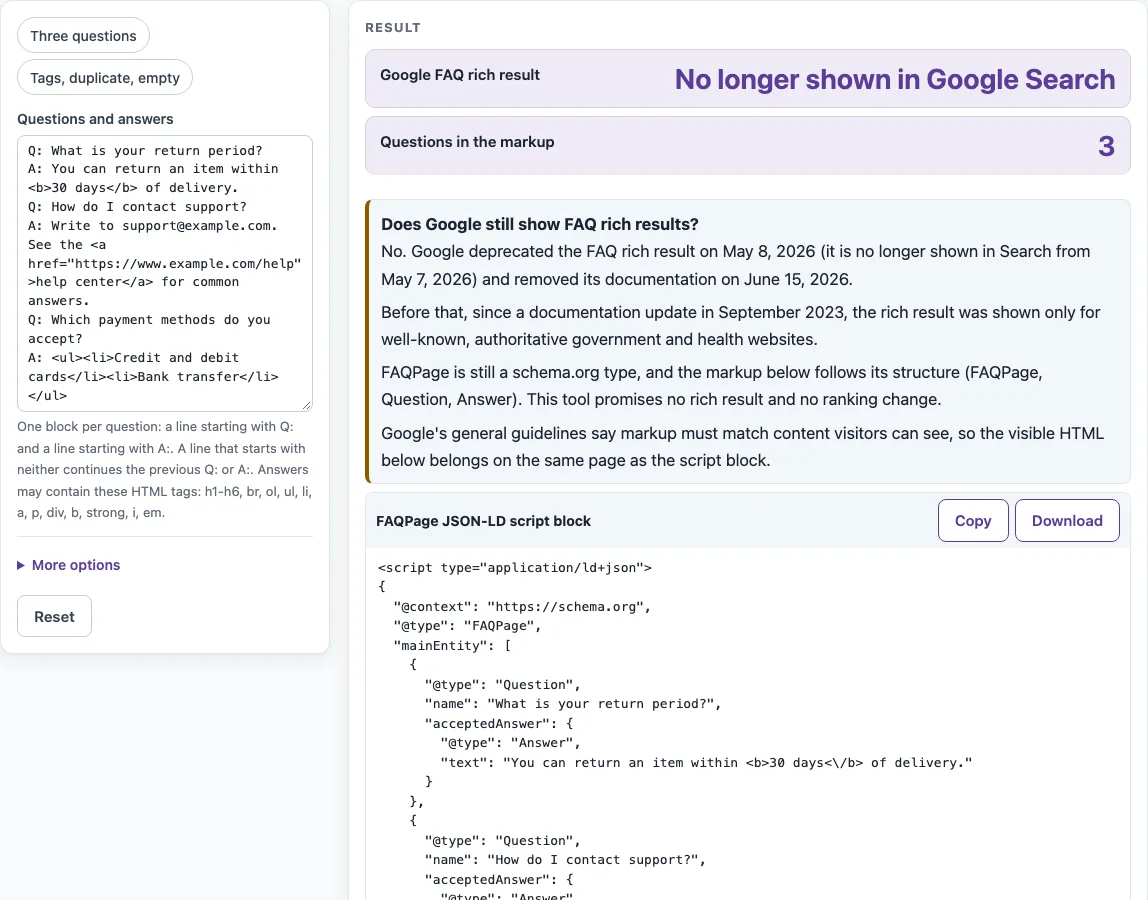
How to use the FAQ schema generator
- Type or paste your pairs into the “Questions and answers” box. Start each question with a line beginning Q: and put its answer on a line beginning A:. Repeat for every pair.
- To see the format first, load one of the presets: “Three questions”, “Tags”, “duplicate” or “empty”.
- Open “More options” and pick a level for “Heading tag for the visible questions”: h2, h3 or h4.
- Read “Questions in the markup” and “Pairs left out” first. Then check “Tags removed from answers” and the warnings, which list duplicates, empty answers and removed tags.
- Read the “Google FAQ rich result” status and the highlighted box “Does Google still show FAQ rich results?” before you decide what to publish.
- Copy the “FAQPage JSON-LD script block” with Copy, or save it with Download.
- Copy the “Matching visible HTML” into your page, then go through the checklist table to confirm each pair.
The presets are the quickest way to see how each kind of input is handled. Each preset fills the box with example text, so you can compare the output against your own pairs before replacing the text. The output updates as you type, so a missing “A:” line or an empty answer shows up at once in “Pairs left out”.
Does Google still show FAQ rich results?
No. Google deprecated the FAQ rich result on 2026-05-08 and said it would no longer appear in Google Search starting May 7, 2026. Google removed the feature’s documentation on 2026-06-15, which is why the tool reports “No longer shown in Google Search” next to the “Google FAQ rich result” status.
Who could get FAQ rich results before?
Google’s September 2023 documentation update limited the FAQ rich result to well-known, authoritative government and health websites. Sites outside those groups were not eligible for it from that point on.
Is FAQPage markup still valid?
FAQPage is still a defined type in schema.org, which describes a WebPage presenting one or more frequently asked questions. This tool writes that structure in order: FAQPage, then mainEntity, then a Question with a name, then an acceptedAnswer, then an Answer with text. The output is valid JSON-LD for that type, but it promises no rich result.
What HTML can I use in answers?
Only h1-h6, br, ol, ul, li, a, p, div, b, strong, i and em are kept. Other tags are removed, but their text stays. Script and style elements are removed along with their content. Attributes are dropped except href on a link, and a link keeps its href only if it is an absolute http or https address. Comments are removed, unclosed tags are closed, and a stray “<” becomes <. This list comes from Google’s former FAQ documentation, which Google has since removed.
Must the FAQ be visible on the page?
Yes. Google’s general guidelines say structured data must match content that visitors can see on the page. The questions and answers in the markup therefore need to appear in the same page. The “Matching visible HTML” output gives you a div.faq with one heading and one div per pair, which is built to match the script block.
How do I format the questions?
Start each question with “Q:” and put its answer on the next line starting with “A:”. Labels are case-insensitive, so q: and a: also work. If an answer runs over several lines, any line that starts with neither label is joined to the previous Q: or A: with a space. Blank lines are ignored.
Why was my answer left out?
An answer is left out when it is empty or contains only tags, and the tool adds a warning for it. A Q: line with no text is also left out. Each omitted pair is counted under “Pairs left out”. Duplicate questions, compared without regard to case, trigger a warning, but both copies stay in the output.
Where do I put the code?
Place the “FAQPage JSON-LD script block” anywhere in the page’s HTML. Place the “Matching visible HTML” where visitors should read the questions and answers. The two parts should both appear on the same page.
Sources (checked 13 October 2026): Google Search Central · schema.org
Worked examples
| Input | Result |
|---|---|
| 3 question and answer pairs | FAQPage with 3 questions, 0 warnings |
| 3 question and answer pairs | FAQPage with 2 questions, 3 warnings |
| 2 question and answer pairs | FAQPage with 2 questions, 0 warnings |
Calculated by the tool above; open it with the same values to see each step.
Frequently asked questions
Does the tool send my text anywhere?
No. Pasted text is processed in your browser and is never sent anywhere. This tool makes no network call.
What does the heading tag setting change?
“Heading tag for the visible questions” sets whether each visible question uses h2, h3 or h4 in the “Matching visible HTML”. The worked example uses h3. Choose the level that fits the heading structure of your page.
Can this tool make HowTo markup?
No. Google removed its HowTo documentation on 2023-09-14, so there is no HowTo generator on this site. Only the FAQ format is available here.
Should I keep FAQPage markup on my pages?
That is your decision. Google no longer shows FAQ rich results, and this tool cannot tell you which other services read FAQPage markup. If you keep it, keep it accurate: every question and answer in the markup should also be visible on the page, and it should change whenever the visible text changes.
What happens if my text has no Q: line?
The tool reports errors with line numbers. Text before the first Q:, an A: before any Q:, and two A: lines for one question each produce an error. If nothing usable remains after processing, the page shows an error instead of output.
Related tools
- Schema markup generator: use it when you need structured data for a schema.org type other than FAQPage.
- Local business schema generator: use it when your page describes a local business.
- Organization schema generator: use it when your page describes the organization behind the site.
- hreflang generator: use it when a page has versions in different languages or regions.
- Meta tag checker: use it when you want to review the meta tags on a page.
- Open Graph checker: use it when you want to check Open Graph tags for link previews.