Hreflang Tag Generator
List your language versions and their URLs to get hreflang tags, or paste tags to check them.
The hreflang tag generator is a free tool that builds hreflang link tags for pages that exist in more than one language or region. You list each version and its URL, and it outputs matching HTML link tags, an HTTP Link header and XML sitemap entries. It can also check tags you already have. The tool runs in your browser, needs no sign-up, and nothing you paste is sent anywhere.
Use it when you publish the same page in several languages or for several countries, such as English for the UK and the US, or German and French. It flags common errors, such as invalid codes, reserved codes and relative URLs, before you publish.
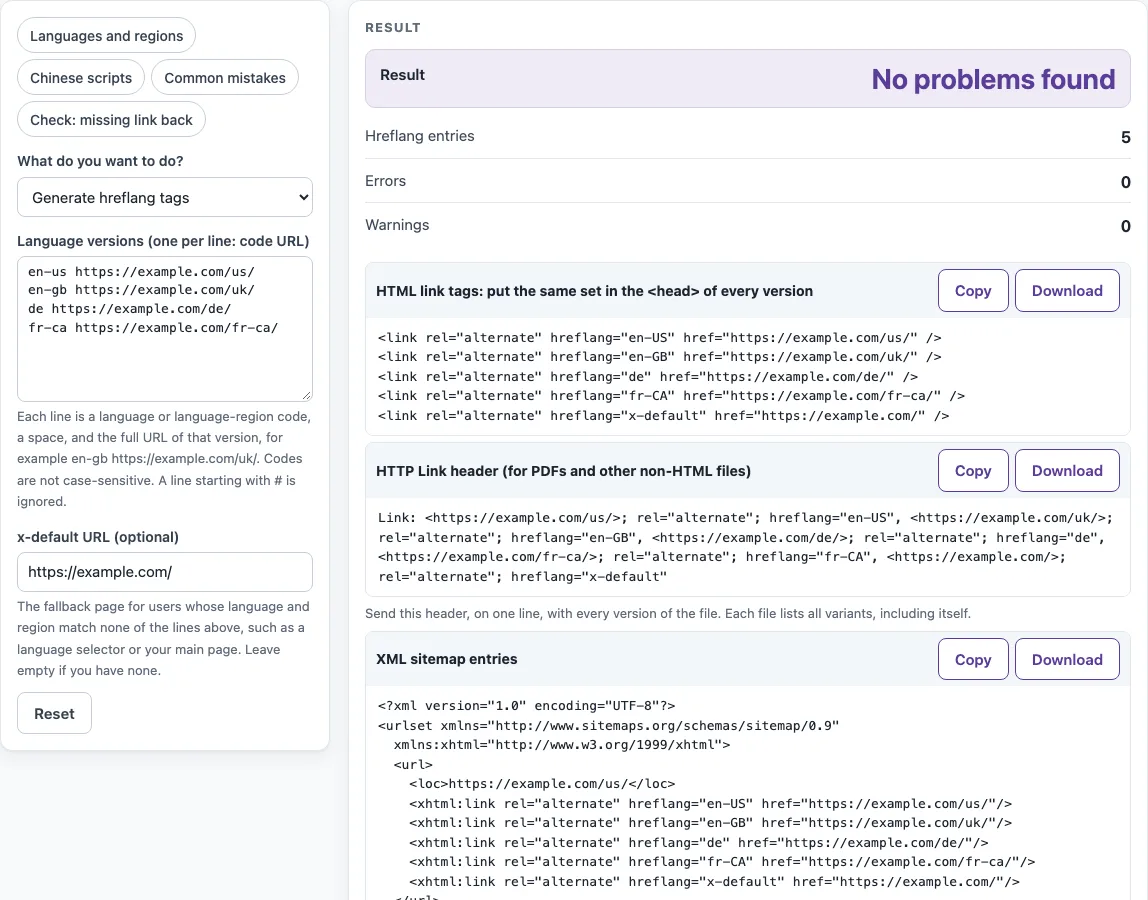
How to use the hreflang tag generator
- Under What do you want to do?, choose Generate hreflang tags. To check tags that already exist on your pages, choose Check pasted tags instead.
- In Language versions (one per line: code URL), type one version per line, for example
en-gb https://example.com/uk/. Separate the code and the URL with a space, tab, comma, semicolon or equals sign. Lines starting with#are ignored, so you can add notes. - If you have a fallback page, enter its address in x-default URL (optional).
- Read the result panel. Errors and Warnings name the line and give the fix. A row with an error is left out of the output, and the status line says “N error(s) found: fix them before you publish”.
- Copy or download the code from the block you need: HTML link tags: put the same set in the
<head>of every version, HTTP Link header (for PDFs and other non-HTML files) or XML sitemap entries. Each block has Copy and Download.
To start faster, pick a preset: Languages and regions, Chinese scripts, Common mistakes or Check: missing link back. The Common mistakes preset loads lines with deliberate errors, so you can see how the messages read. In check mode, paste your tags into Pasted link tags. To check several pages at once, put a line starting with # page: before each page’s tags.
What is hreflang?
Hreflang is an annotation that tells Google which URLs are the language or region versions of the same page. Google’s documentation describes three equivalent ways to give this information: HTML link tags, an HTTP header, or an XML sitemap. Using all three gives no benefit in Search and is harder to maintain, so choose one. Localized versions count as duplicates only when the main content stays untranslated, so a translated page is not a duplicate of its original.
How do I write hreflang tags?
A code is a language code from ISO 639-1 (two letters), optionally followed by a region code from ISO 3166-1 alpha-2, joined by a dash. Codes are not case-sensitive, and the tool writes them with the language in lower case and the region in upper case, such as en-GB. A region cannot stand alone. be is the Belarusian language, not Belgium, so Belgium is written nl-BE or fr-BE.
The HTML form looks like this:
<link rel="alternate" hreflang="en-GB" href="https://example.com/uk/" />
Put one line per version in the <head> of every version, in the same order. Each version must list itself as well as every other version, so the set is identical on every page. URLs must be fully qualified, starting with https:// or http://. A path such as /uk/ does not work. If a URL contains an &, write it as &.
How does the sitemap form work?
In a sitemap, each version gets its own <url> entry with its <loc>, and every entry lists all versions, including itself, as <xhtml:link rel="alternate" hreflang="…" href="…"/> children. The urlset element must declare the xhtml namespace. The generator writes all of that, so a site with three versions gets three entries, each with the same three alternates. The sitemap form is easiest to maintain when the versions live on different hosts or when changing every page’s head is hard.
Sources (checked 13 October 2026): sitemaps.org · W3C · Google Search Central
Worked examples
| Input | Result |
|---|---|
| 5 language lines | No problems found |
| 4 language lines | No problems found |
| 4 language lines | 3 error(s) found: fix them before you publish |
| 3 pasted pages, 7 tags | 3 error(s) found: fix them before you publish |
Calculated by the tool above; open it with the same values to see each step.
Frequently asked questions
What is hreflang x-default?
x-default is a reserved value for users whose language and region match none of your other entries. Use it for a fallback page, such as a language selector or your main page. It takes no language code, and the tool allows only one x-default entry.
Is it en-UK or en-GB?
Use en-GB. UK is not a region code, and the ISO code for the United Kingdom is GB. Google’s documentation says the reserved codes EU, UN and UK have no effect in Search, so en-UK does nothing. The tool reports it as an error and suggests en-GB.
Do I need hreflang and canonical together?
Often, yes, for regional versions in the same language. Google’s canonicalization guidance says to use both canonical and hreflang for same-language variants, such as a US page and a UK page in English. If you use hreflang, the canonical page should be in the same language, or the closest substitute if none exists. Do not add hreflang, lang, media or type attributes to rel="canonical". Use rel="alternate" with hreflang for language and country instead.
What is the difference between the hreflang attribute and the HTML lang attribute?
The hreflang attribute links a page to its alternate versions in other languages or regions. The HTML lang attribute describes the language of the document itself, which browsers and assistive technology use. Google does not use either one to detect a page’s language and relies on its own algorithms instead. The generator produces hreflang tags only.
Why does Google ignore my hreflang?
Google’s documentation says that if two pages do not both point to each other, the tags are ignored, so every version needs return links to the others. Other common causes are a missing self-reference, invalid or reserved codes such as en-UK, and relative URLs. To find these, paste your tags into Check pasted tags. The Check: missing link back preset shows a return-link error in action.
Can I use hreflang for a PDF?
Yes. A PDF cannot hold <link> tags, so Google’s documentation for non-HTML files uses the HTTP Link header. The tool prints it on one line, for example Link: <https://example.com/guide.pdf>; rel="alternate"; hreflang="en-GB", <https://example.com/guide-de.pdf>; rel="alternate"; hreflang="de". The header lists every variant, including the file itself, and is the same on each version. An XML sitemap is the other option.
Related tools
- Schema markup generator: use it to create structured data for a page when you need more than language annotations.
- FAQ schema generator: use it to mark up questions and answers on a page.
- Local business schema generator: use it to describe a business with a location, for example one per country or region.
- Organization schema generator: use it to describe the organization behind your site.
- Meta tag checker: use it to review the meta tags on a page, including canonical-related tags.
- Open Graph checker: use it to check the Open Graph tags that control how a shared link appears.