Internal and Outbound Link Checker
Paste a page's source to see all its internal and external links, with rel values and anchor text.
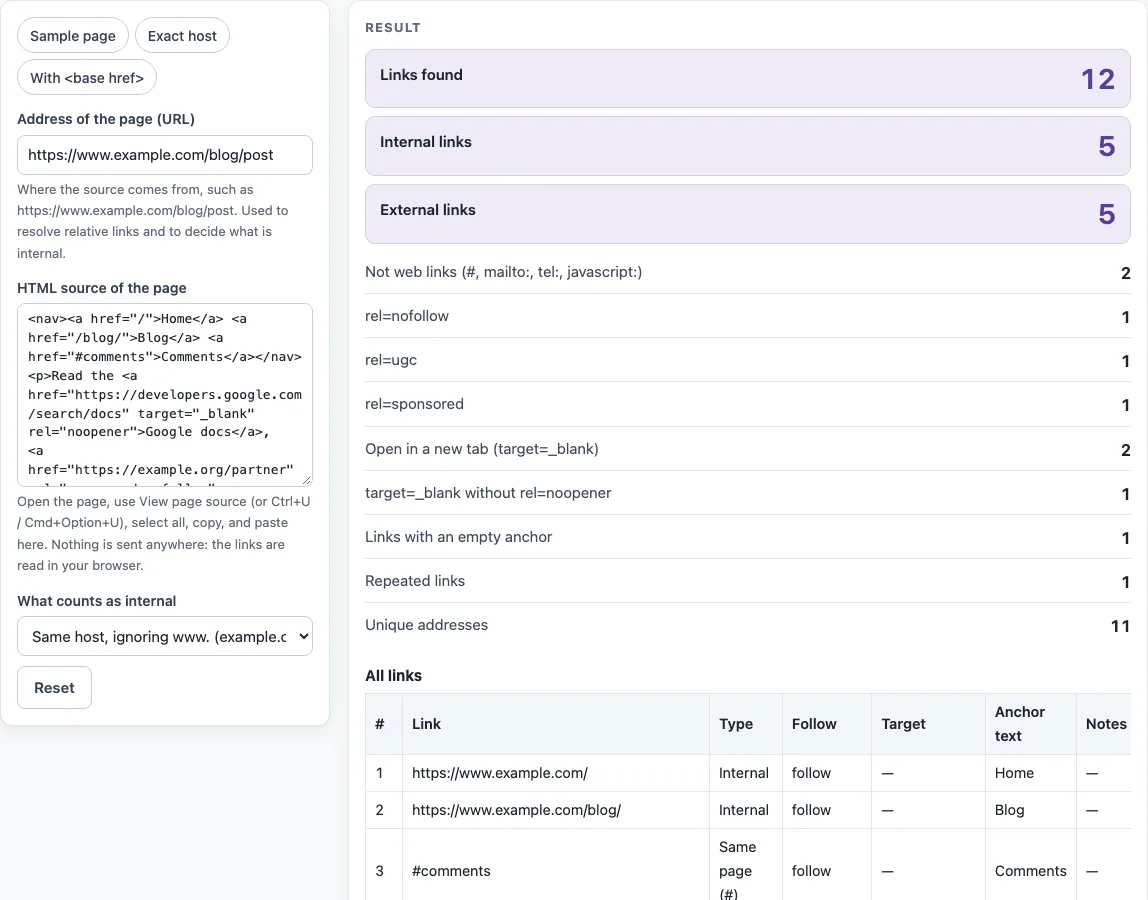
How to use the internal link checker
- Open the page in your browser, choose View page source, and copy all of the source.
- Paste the source into HTML source of the page.
- Enter the page’s full web address in Address of the page (URL). Without it, relative links cannot be resolved and are counted under Could not classify (no page URL).
- Under What counts as internal, choose “Same host, ignoring www. (example.com = www.example.com)” or “Exactly the same host name”.
- Read the summary rows, starting with Links found, Internal links and External links.
- Scan the All links table, which has the columns #, Link, Type, Follow, Target, Anchor text and Notes.
- Check the External hosts table to see how many links point to each other domain.
- Use Links as CSV to copy the data or download links.csv.
The presets Sample page, Exact host and With <base href> load ready-made settings. On the Sample page, the tool reports 12 links: 5 internal, 5 external, 2 not web links, and 1 repeated link. Use it to see what a full result looks like before you paste your own source.
Nothing is requested over the network on this page, so the table appears as soon as the source is pasted, even for very long pages. Use Results as CSV to keep a copy of the list, for example before and after you change a page’s navigation.
How do I tell if a link is nofollow?
The Follow column tells you. It shows “nofollow”, “ugc” or “sponsored” when the link’s rel attribute contains one of those values, and “follow” when none of them is present.
Google documents three values for qualifying links. Use rel=“nofollow” when the other values do not apply and you would rather Google not associate your site with, or crawl, the linked page from your site. Use rel=“ugc” for user-generated content such as comments and forum posts. Use rel=“sponsored” for paid links. Google says links marked this way “will generally not be followed”. The values can be combined, so the column may show “nofollow, ugc”. The value “follow” is only the label the tool gives to a link with no restricting value, because rel=“follow” does not exist.
Is www.example.com internal to example.com?
Yes, in the default mode. “Same host, ignoring www.” treats a link as internal when its host equals the page’s host after a leading “www.” is removed. Choose “Exactly the same host name” if you want www.example.com and example.com treated as different hosts. Port numbers and upper or lower case are ignored in both modes.
What is rel=noopener?
rel=“noopener” is a link type that stops a new tab opened by a link with target="_blank" from controlling the page that opened it. The HTML Standard says that for target="_blank", noopener applies unless rel=“opener” is present, and noreferrer also implies noopener. Browsers that follow the standard therefore apply it by default. Writing rel=“noopener” explicitly helps older browsers. The Target column shows “_blank (noopener)” when rel has noopener or noreferrer, and the tool gives a warning for “target=_blank without rel=noopener”.
Which rel value should I use for paid links?
Use rel=“sponsored”. Google documents it for paid links, such as ads and paid placements. The other two values, “nofollow” and “ugc”, are for other situations. In the tool, a paid link marked this way shows “sponsored” in the Follow column.
Sources (checked 13 October 2026): Google Search Central · WHATWG HTML
Worked examples
| Input | Result |
|---|---|
| https://www.example.com/blog/post | 12 links: 5 internal, 5 external |
| https://example.com/shop/ | 3 links: 1 internal, 2 external |
| example.com/docs/guide.html | 3 links: 1 internal, 2 external |
Calculated by the tool above; open it with the same values to see each step.
Frequently asked questions
How do I find all outbound links on a page?
Paste the page source into HTML source of the page, enter the page address, and read the External links row. The External hosts table then shows how many links go to each other domain.
Is a subdomain an internal link?
No. blog.example.com is external to example.com in both modes, because only the host name is compared and other subdomains always count as external.
Does this check whether the links work?
No. The tool only reads the HTML source and sends nothing over the network, so it cannot tell you whether a link returns an error. For a broken internal link checker, use the broken link checker page listed below.
Can this internal link checker check a whole website?
No. It reads one page’s source at a time, so paste the source of each page you want to check.
Why do the same links appear several times?
Navigation, header and footer links repeat on a page, and the table counts every occurrence. Duplicates are marked, so you can tell a link that appears once in the body text from one that is repeated in every menu or footer.
Related tools
- Broken link checker: use it when you need to know whether links return errors.
- Redirect checker: use it to see where a web address redirects.
- Bulk redirect checker: use it when you have many redirects to review at once.
- Meta tag checker: use it to review the meta tags on a page.
- Canonical tag checker: use it to check which canonical tag a page declares.
- XML sitemap generator: use it to create a sitemap that lists your page addresses.