Local Business Schema Generator
Fill in your business details and hours to get LocalBusiness JSON-LD structured data.
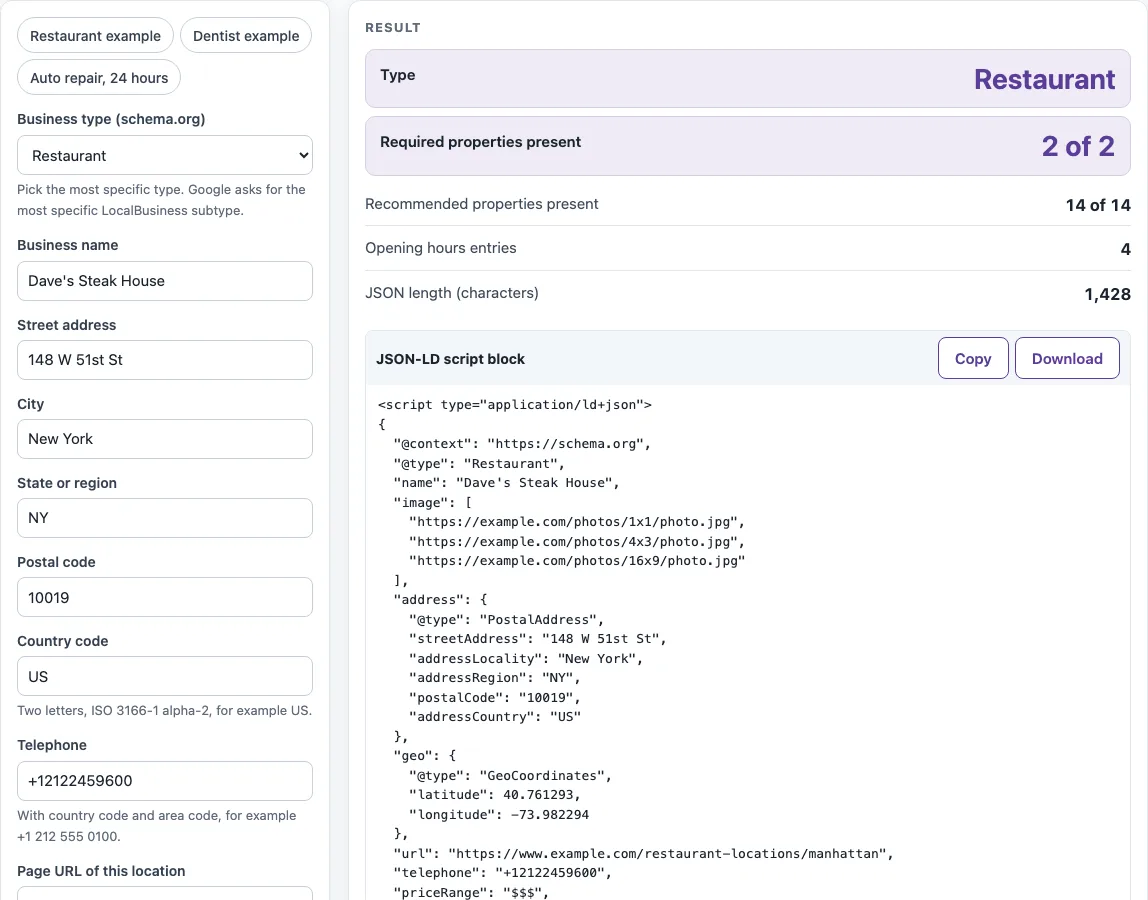
How to use the Local business schema generator
- Choose a preset (“Restaurant example”, “Dentist example”, “Auto repair” or “24 hours”) to load sample values, or start with an empty form.
- Select a Business type (schema.org) from the list of 66 LocalBusiness types. Pick the most specific one that fits.
- Enter Business name, Street address, City, State or region, Postal code and a two-letter Country code.
- Enter Telephone with its country code, starting with “+”.
- Enter the Page URL of this location, as a full web address.
- Type Opening hours, one line per group of days.
- For food types, fill in Cuisine served and Menu URL.
- Under More options, add Latitude, Longitude, Image URLs, Price range or Other profiles (sameAs) if you have them.
- Read the results: Required properties present, Recommended properties present, Opening hours entries, and JSON length (characters). Fix any errors or warnings.
- Use Copy or Download to get the JSON-LD script block, then compare it with the Property checklist for
<type>.
Use the presets to see working examples before you enter your own details. The result updates as you type, so you can test each change before you copy the code. Notes under the result point out a phone number without a country code and coordinates with fewer than 5 decimal places, and an opening-hours line the tool cannot read stops the output with an error that names the line.
What is local business schema?
Local business schema is JSON-LD that tells search engines the name, address, phone number and hours of a business at a specific location. It is written in a script block in the page’s HTML. The format follows schema.org’s LocalBusiness type.
Which properties are required?
Google’s local business documentation lists name and address as required. Everything else, such as telephone, url, geo and openingHoursSpecification, is recommended, so a result can show all required properties present and still miss recommended ones.
How do I write opening hours?
Write one line per group of days, with the days first and the times after, such as “Mon-Fri 09:00-17:00”. Days with the same hours can share a line, and “Sat 10:00-14:00, 15:00-18:00” creates two entries for one day. The tool outputs times as HH:MM.
How do I mark a business open 24 hours?
Write “Mon-Sun 24 hours” on one line. The tool sets opening at 00:00 and closing at 23:59 for those days. Google’s rules use this pattern for round-the-clock opening.
How do I mark a closed day?
Write the day followed by “closed”, for example “Sun closed”. The tool sets opening and closing to 00:00 for that day. Leave closed days out of your other lines so each day appears once.
Which type do I choose?
Choose the most specific type in the list, such as Dentist instead of LocalBusiness. A specific type tells search engines more about the business. If your business does not match any listed subtype, use the closest general one.
Do I need latitude and longitude?
Latitude and longitude are recommended, not required. If you add them, use at least 5 decimal places, and keep latitude between -90 and 90 and longitude between -180 and 180. You must enter both values or neither.
Can I add star ratings?
Not with this tool. The tool never writes aggregateRating or review. Google restricts review stars for businesses that review themselves, and review markup is meant for sites that collect reviews of other local businesses.
Sources (checked 13 October 2026): Google Search Central · schema.org
Worked examples
| Input | Result |
|---|---|
| Restaurant: Dave's Steak House | required 2 of 2, recommended 14 of 14, 4 opening hours entries |
| Dentist: Example Family Dental | required 2 of 2, recommended 11 of 12, 3 opening hours entries |
| AutoRepair: Example Auto Service | required 2 of 2, recommended 7 of 10, 1 opening hours entries |
Calculated by the tool above; open it with the same values to see each step.
Frequently asked questions
Is anything I type sent to a server?
No. The generator has no network call, so the business details stay in your browser while you build the markup.
Why does the tool warn me about my telephone number?
A warning appears when the telephone number does not start with “+” and a country code. Enter the number in international format, such as “+1 555 0100”, to clear it.
What does a missing required property mean?
It means the markup lacks name or address, which Google’s documentation requires. An empty name is an error, and the result will not pass the required check until you fill it in.
Does valid markup guarantee a rich result?
No. Valid markup does not guarantee a rich result from Google or Bing. The markup should also match what the page shows visitors, so the hours and address in the script must match the page.
Where do I put the markup?
Put the script block on the page about that location, usually the contact or location page, or the home page of a single-location business. A business with several branches usually gives each branch its own page and its own block, each with that branch’s own address and hours.
Can I list several business types for one location?
Not with this tool. Listing several types as an array is not offered here, so choose the one most specific type for the location.
Related tools
- Schema markup generator: use it when your page needs a schema type other than local business.
- FAQ schema generator: use it to mark up questions and answers on a page.
- Organization schema generator: use it to describe the company behind your locations.
- Meta tag checker: use it to check the title and description tags on your location page.
- Open Graph checker: use it to check how a location page’s social preview tags are set.
- hreflang generator: use it when the same location page exists in several languages.