Meta Description Length Checker
Type or paste a meta description to see its length, estimated width and a result preview.
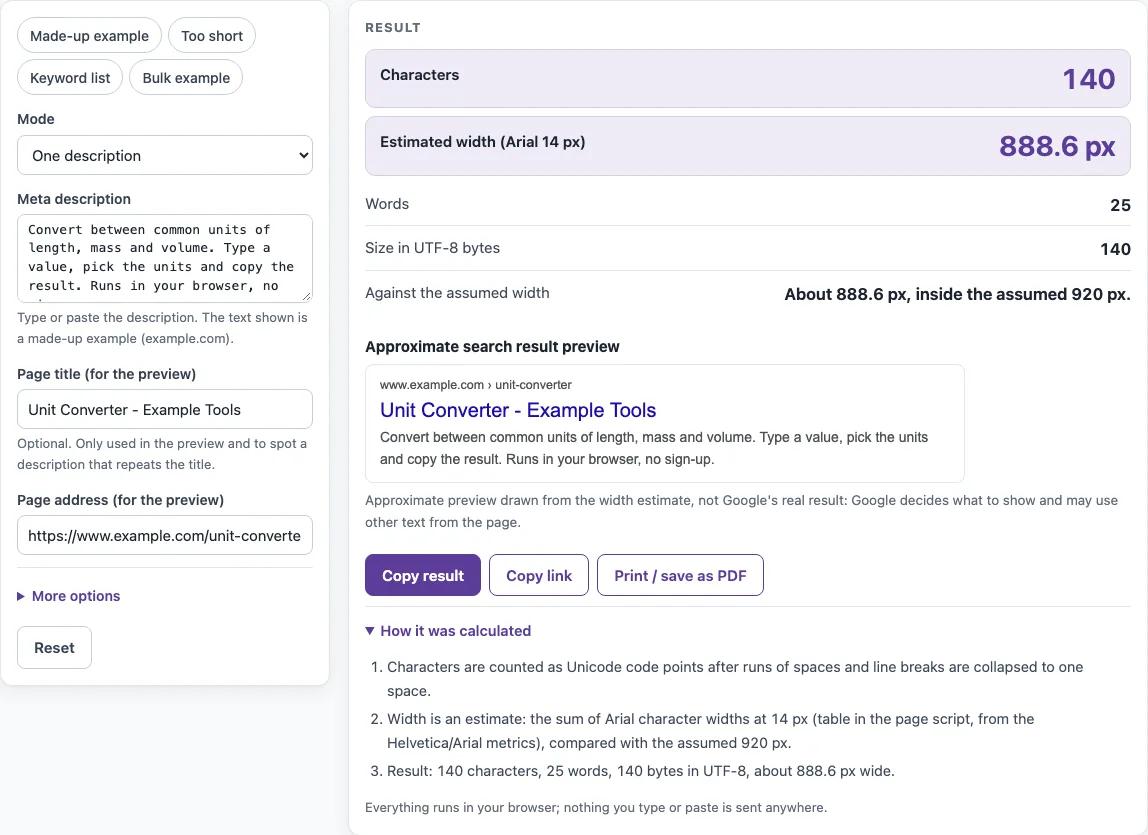
How to use the Meta description length checker
Follow these steps to check one description or a whole list.
- Open “Mode” and choose “One description” for a single text, or “Bulk: one description per line” for a list.
- In single mode, type or paste your text into “Meta description”. Runs of spaces and line breaks become one space, so paste freely.
- Optionally fill in “Page title (for the preview)” and “Page address (for the preview)”. These feed the preview and the note about matching the title.
- Under “More options”, check “Assumed snippet width (px)”. The default is 920, and you can set any value from 100 to 3000.
- Read “Characters”, “Words”, “Size in UTF-8 bytes” and the large “Estimated width (Arial 14 px)” figure.
- Compare the result with “Against the assumed width”, then read the notes list and “How it was calculated”.
- Check the “Approximate search result preview” to see where the description may be cut.
- For a list, switch to Bulk mode and paste one description per line into “Descriptions one per line”. The tool accepts up to 500 lines, skips blank lines and keeps the line numbers.
- Review the table (Line, Characters, Words, Est. width (px), Notes, Text) and the outputs “Descriptions checked”, “Wider than the assumed width”, “Repeated descriptions” and “Widest description”.
The four presets, Made-up example, Too short, Keyword list and Bulk example, load sample text. Use them to see what each kind of note looks like before you check your own descriptions.
What is the meta description length limit?
Google documents no fixed character limit for meta descriptions. Its guidance says the snippet is truncated as needed, typically to fit the device width, so the real cut point depends on the letters and the screen. This tool shows an estimate in pixels, compared with the width you set in “Assumed snippet width (px)”.
How long should a meta description be?
It should be long enough to summarize the page clearly and specifically, which is what Google’s guidance asks for. Very short text is weak: “Mechanical pencil” is 17 characters and 2 words, about 111.3 px, and the tool notes that it is very short. A keyword list is also weak. The tool labels text as “Keyword list” when it has four or more comma-separated parts of at most three words each and no closing sentence punctuation. This is the tool’s own heuristic, based on Google’s example of a list of single keywords as a poor description.
How many characters is my meta description?
“Characters” counts the Unicode code points of the normalized text, so each emoji or accented letter counts as one. “Café ☕” is 6 characters but 9 bytes in UTF-8, which is the figure “Size in UTF-8 bytes” reports. “Words” counts runs of non-whitespace characters.
Is 160 characters the limit?
No. The “155-160 characters” figure often quoted is an industry convention, not a Google rule. Width depends on the letters: in Arial, “iii” is 666 units and “WWW” is 2832 units per 1000 em. The tool adds up per-character widths of Arial at 14 px, taken from Helvetica Core-14 advance widths, which Arial matches. Accented letters use their base letter, CJK, Hangul and emoji count as 1 em, unknown scripts count as 0.6 em, and kerning and hinting are ignored. The made-up default description, 140 characters long, measures about 888.6 px, inside the 920 px assumption.
Why does Google show a different description?
Google mainly builds snippets from the page content. It sometimes uses the meta description when that description describes the page better for a particular query. The same page can therefore show different text for different searches, which is why the tool’s preview is labelled approximate. Google’s guidance asks for a unique description on each page and says that identical or similar descriptions on every page are not helpful.
Can I check many descriptions at once?
Yes. Bulk mode checks each line of “Descriptions one per line” separately and reports its length, width and notes. A line that matches an earlier line, ignoring case and normalized spacing, is marked “same as line N”. Programmatically generated descriptions are acceptable for large database-driven sites if they are human-readable and diverse.
Sources (checked 13 October 2026): Google Search Central · WHATWG HTML
Worked examples
| Input | Result |
|---|---|
| Convert between common units of length, mass and volume. Type a value, pick the units and copy the result. Runs in your browser, no sign-up. | 140 characters, about 889 px |
| Mechanical pencil | 17 characters, about 111 px |
| Sewing supplies, yarn, colored pencils, sewing machines, threads, bobbins, needles | 82 characters, about 521 px |
| 5 descriptions | 1 wider than assumed, 1 repeated |
Calculated by the tool above; open it with the same values to see each step.
Frequently asked questions
Does the tool send my text anywhere?
No. Everything runs in your browser, and nothing is sent anywhere. The tool is free and needs no sign-up.
What does “Wider than the assumed width” mean?
It means the estimated width is larger than the value in “Assumed snippet width (px)”. The tool’s note says the description “may be shortened”. This is an estimate, not a hard limit.
Why is my description cut in the preview?
The preview cuts the description where the estimate says it may be cut at the assumed width. For example, “Hello World Hello World” checked against 100 px is cut after “Hello World”, because the full text measures 148.6 px at 14 px.
Can I change the assumed width?
Yes. Open “More options” and set “Assumed snippet width (px)” to any value from 100 to 3000. Changing it changes the comparison and the preview cut point, not your text.
Do I need a meta description on every page?
Google does not require one, and it builds the snippet from the page content when there is none or when the page text fits the query better. Writing a specific description for important pages gives Google a good option to use, and the tool helps you keep each one distinct.
What does the note “Same as the page title” mean?
It means your description matches the page title when letter case is ignored. This is the tool’s own observation and is not attributed to Google.
Related tools
- Meta tag checker: Use it to review the meta tags on a page alongside the description.
- Title tag length checker: Use it to estimate the width of your page title before you compare it with your description.
- Open Graph checker: Use it when you want to review Open Graph tags for how a page is shared.
- Canonical tag checker: Use it to check which address a page declares as its canonical version.
- Noindex checker: Use it to check whether a page carries a noindex instruction.
- Schema markup generator: Use it to create structured data markup for a page.
- hreflang generator: Use it to build hreflang annotations for pages available in several languages.