Meta Tag Checker
Paste a page's source to check every tag in its head, and optionally its response headers.
How this check works: our server sends one ordinary GET request per redirect step (at most 10) to the public address you enter, the same request a browser would make, and shows you a short summary — status codes, selected response headers and, for robots.txt, the file itself (up to 64 KB). It never sends data on your behalf, never contacts private or internal addresses, and does not log or store what you type; results are cached for 10 minutes and each visitor can run 10 checks per minute.
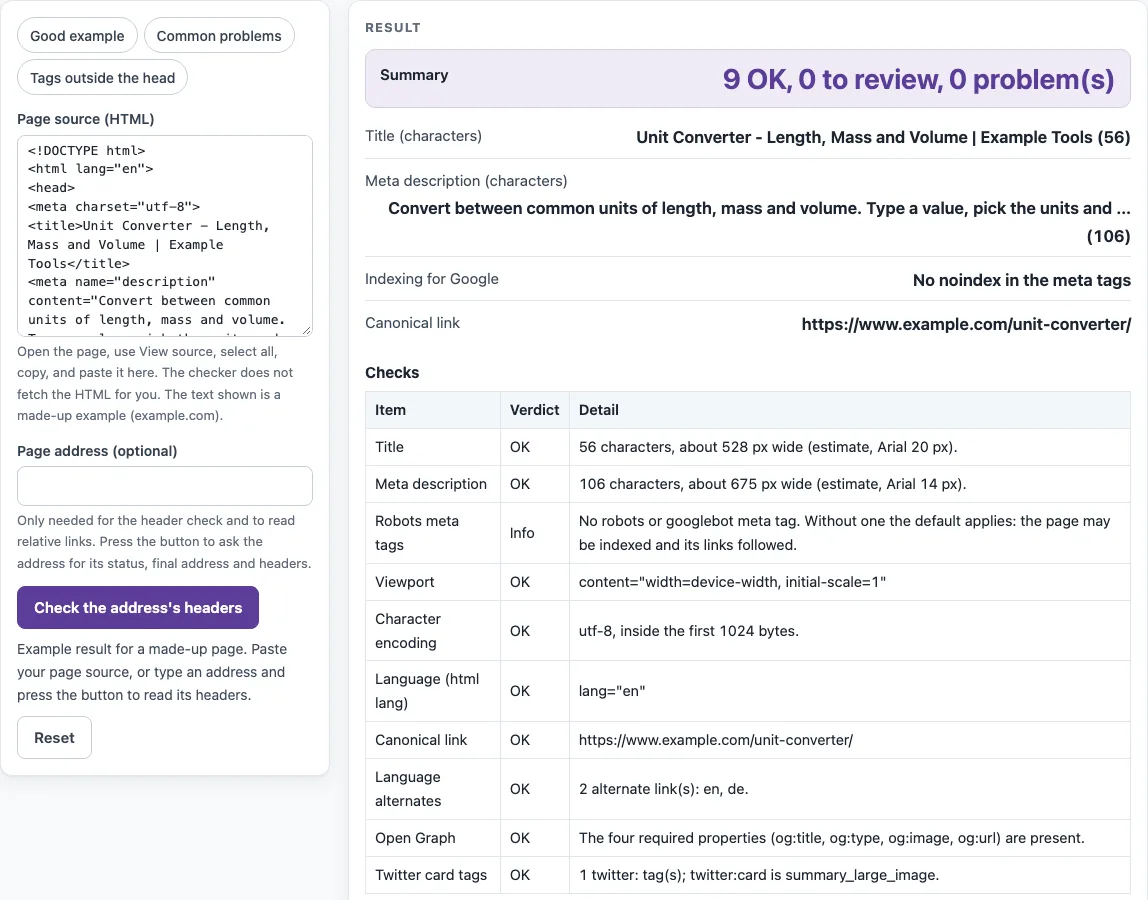
How to use the Meta tag checker
- Open the page in your browser and choose View source. Select all the text and copy it.
- Click inside “Page source (HTML)” and paste the copied HTML. The checks start as soon as the source is in the box. The limit is 3 million characters.
- Read the “Summary” line, such as “9 OK, 0 to review, 0 problem(s)”.
- Check “Title (characters)” and “Meta description (characters)” for the length and estimated width of each.
- Optional: type the address into “Page address (optional)” and press “Check the address’s headers” to add the status, final address after redirects, X-Robots-Tag and Link header to the checks.
- Go through the “Checks” table. Each row shows a Verdict and a Detail.
- Open “Every tag found” to see every title, html lang, base, meta and link tag. Tags placed after the head ended are marked.
The chips “Good example”, “Common problems” and “Tags outside the head” load sample source so you can see what each verdict looks like. A sample page for example.com is already shown when the tool opens.
If you press “Check the address’s headers” while the sample source is still in the box, the sample is cleared first, so the result never mixes a made-up page with a real address. With no source pasted, the result shows only the header findings and says which tag checks were skipped; paste the source afterwards to add them.
How do I check my meta tags?
Copy the HTML from View source and paste it into the tool. The source is the HTML the server sent, so tags added later by JavaScript will not appear in it. The Checks table covers Title, Meta description, Robots meta tags, Viewport, Character encoding, Language, Canonical link, Language alternates, Open Graph, Twitter card tags, Tags outside the head and Meta refresh.
How do I check the meta title and description?
A missing or empty title is a Problem. More than one title in the head is a Review, because the HTML standard allows only one title element per document. The width figures are estimates: titles are measured in Arial 20 px against an assumed 600 px, and descriptions in Arial 14 px against an assumed 920 px. Google documents no character limit for either, so treat these figures as guides.
Can it fetch the page by URL?
No. The check service never returns page bodies, so the HTML has to be pasted. The header check reads the status, redirects, X-Robots-Tag and Link header for an address. It reads at most 10 redirect hops.
Is a meta description required?
No. A missing or empty meta description is a Review, not a Problem, because Google builds snippets mainly from page content. More than one meta name=“description” is a Review, since the HTML standard allows only one.
Why is my meta tag reported outside the head?
The head ends at </head>, at <body>, or at the first element that cannot appear in a head. Contents of <noscript> do not end it. A tag after that point is marked in “Every tag found” and is not counted, so a description placed after </head> is reported as missing.
What does noindex in the robots meta tag do?
Noindex, or none, in name=“robots” or name=“googlebot” is a Review, because Google keeps the page out of search results. The values are case-insensitive, and none means noindex, nofollow. Other bot names are listed but do not count, and no robots tag gives Info, since the default allows indexing.
The charset declaration should appear within the first 1024 bytes of the page, as the HTML standard requires. Canonical links count only inside the head, and Google accepts rel=“canonical” there only.
Sources (checked 13 October 2026): Google Search Central · WHATWG HTML · Open Graph protocol
Worked examples
| Input | Result |
|---|---|
| page source, 931 characters | 9 OK, 0 to review, 0 problem(s) |
| page source, 156 characters | 0 OK, 6 to review, 0 problem(s) |
| page source, 130 characters | 3 OK, 3 to review, 0 problem(s) |
| page source, 204 characters | 3 OK, 2 to review, 0 problem(s) |
Calculated by the tool above; open it with the same values to see each step.
Frequently asked questions
Is the meta tag checker free?
Yes. It is free and needs no sign-up. Pasted HTML is processed in your browser and is never sent anywhere.
Does it check Open Graph tags?
Yes. The Open Graph check passes when og:title, og:type, og:image and og:url are all present, as the ogp.me protocol requires. Otherwise it is a Review that lists the missing properties. Twitter tags are listed with their twitter:card value.
How many address checks can I run?
The header check is limited to 10 checks a minute per visitor. Answers are cached for 10 minutes.
What if a tag is added by JavaScript?
View source shows the HTML the server sent, so tags inserted later by scripts are not in it and are reported as missing. If your site adds tags with JavaScript, copy the rendered HTML from the browser’s developer tools instead, and keep in mind that search engines have to render the page to see those tags too.
Is my page source uploaded?
No. Pasted source stays in your browser. Only an address entered in “Page address (optional)” is sent to this site’s read-only check service, which stores nothing.
Does it check the HTTP status of the page?
Only if you enter the address and press “Check the address’s headers”. Pasted source alone has no status, so the status row appears only after that check.
Related tools
- Broken link checker: Use it to find links on a page that no longer work.
- Internal and outbound link checker: Use it to review the internal and outbound links on a page.
- Redirect checker: Use it to follow a web address through its redirects.
- Bulk redirect checker: Use it when you have many addresses to check for redirects.
- Canonical tag checker: Use it to examine canonical links in more depth.
- XML sitemap generator: Use it to create a sitemap listing the pages you want search engines to find.