Meta Tag Generator
Fill in your page details to get the head tags to copy, with what each tag does.
This meta tag generator builds the meta tags for one page’s head section from a simple form, then shows the HTML so you can copy it into your page. Fill in the page title, description, address, robots setting and sharing fields, and the tool writes the tags for you. It also works as an open graph generator, because the form covers the og: properties and the X (Twitter) card tags that control how a link looks when it is shared.
Everything runs in your browser, so nothing you type is sent anywhere. The tool is free to use. You can generate meta tags for a blog post, a home page, a private page or a minimal set, then check the length and error messages before you publish. The tool produces the tags only, so you still need to paste them into the head of your page.
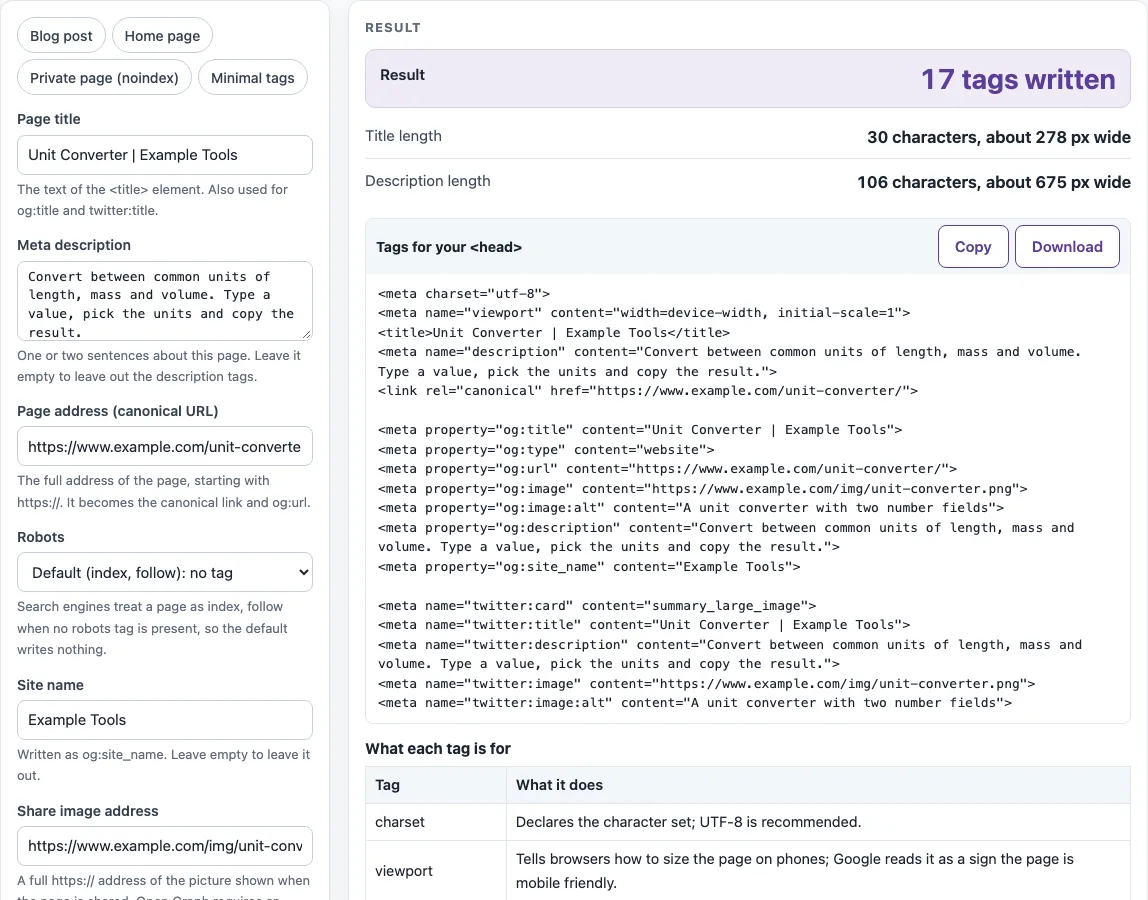
How to use the Meta tag generator
- Pick a preset chip if one fits: Blog post, Home page, Private page (noindex) or Minimal tags. A preset fills the form, and you can change any field afterwards.
- Type your Page title. The Title length box shows the character count and an estimated width in pixels.
- Write a Meta description. Check the Description length box before you move on.
- Enter the Page address (canonical URL). It must start with http:// or https://.
- Choose a Robots setting. Leave Default (index, follow) if you do not want a robots tag written.
- Fill in Site name, Share image address and Share image description.
- Pick an Open Graph type (website or article) and an X (Twitter) card option, or keep No card tags.
- Open More options to set a Locale such as en_US, add a Google site verification code if you have one, and decide whether to keep “Add charset and viewport tags” ticked. It is ticked by default.
- Read the Result line, such as “17 tags written”, and fix any errors or warnings.
- Copy the code from Tags for your, or select Download to get head-tags.html. Use the table What each tag is for to check what each line does.
Presets are the quickest way to start, and the Minimal tags preset suits a page that needs only the basics.
What meta tags should every page have?
Google’s page on supported meta tags names the ones that matter. The title element names the page, and the description tag gives a short summary that Google sometimes uses in search snippets. The charset tag sets the character set, and Unicode (UTF-8) is recommended. The viewport tag tells browsers how to render the page on mobile devices, and its presence signals that the page is mobile friendly. The robots tag is needed only to change the default, and google-site-verification is only for Search Console. The tool always writes a title, writes the description and canonical link when you fill them in, and writes the charset and viewport tags by default; you can switch those two off under More options.
How do I add Open Graph tags?
Open Graph tags are og: properties in the head that control how a shared link appears. The required properties are og:title, og:type, og:image and og:url. The og:description, og:site_name and og:locale properties are optional, and pages with an og:image should also include og:image:alt, which describes what the image shows. The tool uses the page title for og:title, the description for og:description, the page address for og:url, and the share image fields for og:image and og:image:alt.
Does Google use the meta keywords tag?
No. Google does not use the meta keywords tag, and it has no effect on indexing or ranking. This tool never writes it, so the form has no keywords field.
What does the robots meta tag do?
The robots meta tag tells search engines how to crawl and index a page. Google’s documentation says the default values are index, follow, so the Default (index, follow) choice writes no tag at all. The other choices are noindex, nofollow, noindex, nofollow and nosnippet. Noindex asks search engines not to show the page in results. The tool does not write googlebot, notranslate, nopagereadaloud, rating or refresh.
What is the canonical link for?
The canonical link tells search engines which URL is the preferred version of a page when the same content can be reached at more than one address. Google’s SEO Starter Guide advises redirecting non-preferred URLs to the preferred one, and using rel=“canonical” if a redirect is not possible. The tool writes a tag from the Page address you enter, so type the exact preferred URL there.
Where do the tags go?
The tags go inside the
element of the page, not in the body. Copy the whole block from Tags for yourand paste it betweenandin your HTML. The tool writes the tags in a fixed order: charset, viewport, title, description, canonical link, robots, google-site-verification, then a blank line and the Open Graph tags, followed by the card tags.Sources (checked 18 October 2026): Meta tags that Google supports · The Open Graph protocol · SEO Starter Guide
Worked examples
| Input | Result |
|---|---|
| Unit Converter | Example Tools | 17 tags |
| Unit Converter | Example Tools | 13 tags |
| Tom & Jerry "Fan" Page | 17 tags |
| Unit Converter | Example Tools | 13 tags |
Calculated by the tool above; open it with the same values to see each step.
Frequently asked questions
Can I use this as an open graph generator?
Yes. Open Graph type, Share image address, Share image description and Site name write the og: tags, and the X (Twitter) card options write the twitter: tags. The Locale field under More options sets og:locale.
Is there a preset for a private page?
Yes. The Private page (noindex) preset sets the robots choice to noindex, nofollow and leaves out the card tags, for a page you do not want search engines to show. You can change the setting after applying the preset.
Will special characters break my tags?
No. Ampersands, double quotes and angle brackets in your text are escaped as &, ", < and >, so they cannot break the tag.
What errors does the tool check for?
It flags an empty title, a page address that does not start with http:// or https://, and a locale that does not look like en_US. Fix these before you copy the code.
Can I leave the description empty?
Yes. The description, og:description and twitter:description tags are then left out, and a warning tells you so.
When do I need the Google site verification code?
Only if you verify ownership in Search Console with the HTML tag method. The tool writes that tag only when you type a code under More options.
Does the tool create hreflang links or schema markup?
No. It does not generate hreflang links or JSON-LD structured data. Use the Hreflang generator or the Schema markup generator for those.
Related tools
- Title tag length checker — Use it to check whether a title is likely to be cut off in search results.
- Meta description length checker — Use it to check the length of a description before you publish.
- Meta tag checker — Use it to review the meta tags already on a page.
- Open Graph checker — Use it to check the og: tags on a page that is already live.
- Canonical tag checker — Use it to confirm the canonical link on a page is correct.
- Noindex checker — Use it to check whether a page is set to noindex.
- Hreflang generator — Use it to create hreflang links for pages in several languages.
- Schema markup generator — Use it to create JSON-LD structured data for a page.