Noindex Checker
Enter a URL and paste its source to see whether anything stops Google from indexing it.
How this check works: our server sends one ordinary GET request per redirect step (at most 10) to the public address you enter, the same request a browser would make, and shows you a short summary — status codes, selected response headers and, for robots.txt, the file itself (up to 64 KB). It never sends data on your behalf, never contacts private or internal addresses, and does not log or store what you type; results are cached for 10 minutes and each visitor can run 10 checks per minute.
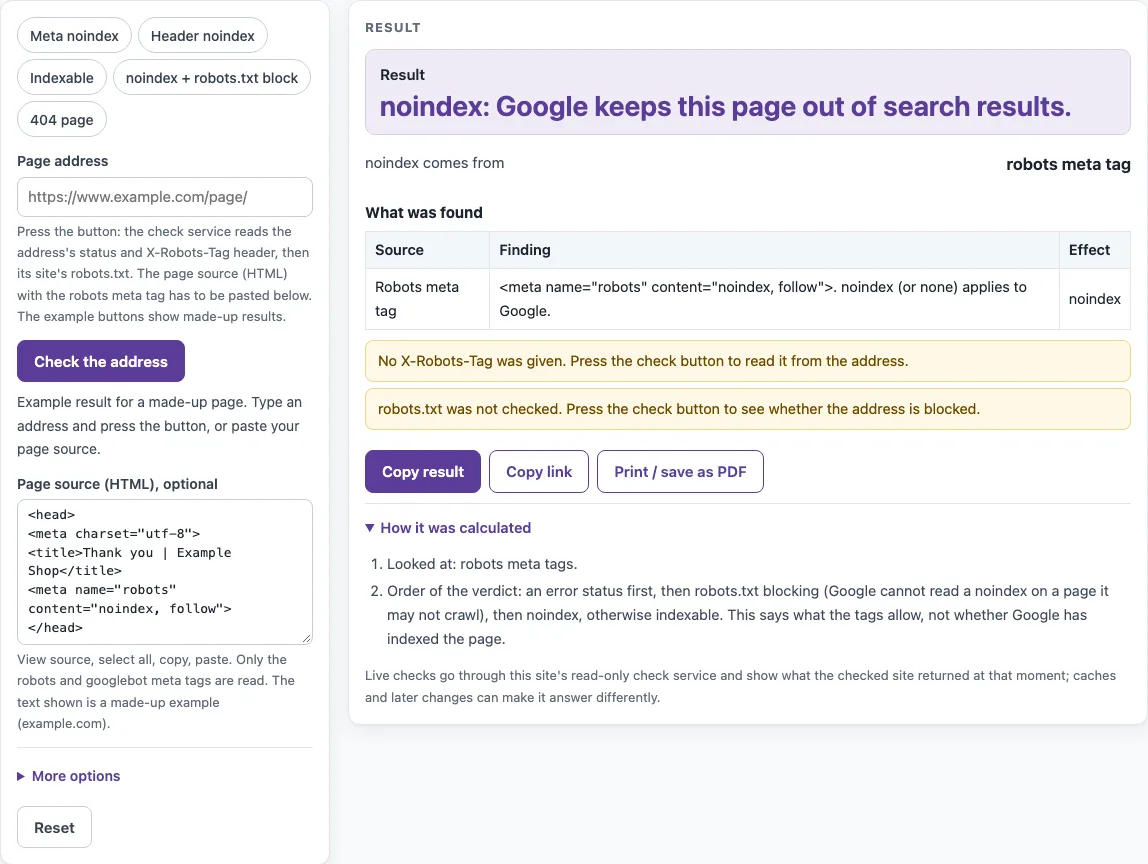
How to use the noindex checker
- Type the full page address into the address box, including https://.
- Press “Check the address”. The check requests the address, follows up to 10 redirects, and reads robots.txt for the host of the final address.
- Read “Result” first. It gives one verdict for the page.
- Check “noindex comes from” to see whether the X-Robots-Tag header, the robots meta tag, or both set the noindex.
- Look at “robots.txt for Googlebot”, “HTTP status”, and “Address checked (after redirects)” to confirm which address was tested and whether it answered.
- To check a meta tag, open the page in your browser, choose View source, copy the HTML, and paste it into “Page source (HTML), optional”. Press “Check the address” again so the pasted source is included.
- To enter a header yourself, open “More options” and type into “X-Robots-Tag header (filled by the check, or paste)”.
- Review “What was found”. Each row lists a Source, a Finding, and an Effect.
Each press of “Check the address” uses 2 of the 10 checks allowed per minute for each visitor. Answers are cached for 10 minutes, so a repeat check shortly after a server change may show the old result.
The address check makes two requests to the check service, one for the page’s headers and one for the robots.txt of the final host, so it counts twice against the limit of 10 checks a minute.
How do I check if a page is noindex?
Check two places: the X-Robots-Tag HTTP header, which the check service returns, and the robots meta tag in the HTML, which you must paste. A page is noindex if either source contains a noindex value.
Where can noindex come from?
A noindex can come from three sources: a robots meta tag, a googlebot meta tag, or the X-Robots-Tag header. The robots meta tag applies to all crawlers, and the googlebot meta tag applies only to Google’s web search crawler. An X-Robots-Tag rule without a prefix applies to all crawlers, while a rule such as googlebot: noindex applies only to Googlebot. When sources conflict, the more restrictive rule applies, so any noindex wins.
Why is my noindex page still in Google?
A noindex page can stay in results for two main reasons. Robots.txt may block crawling, so Google cannot see the noindex, or Google has not recrawled the page yet. The tool shows what the tags allow now, not whether Google has already removed the page. Google’s own tools for site owners show whether a page is indexed.
Does robots.txt Disallow remove a page from Google?
No. A Disallow rule only stops Google from crawling the page, and robots.txt is not a way to keep a page out of search results. A blocked address can still appear without a description if other pages link to it. To keep a page out, use a noindex in a meta tag or X-Robots-Tag header, or protect the page with a password. The tool’s robots.txt matcher follows RFC 9309: it uses the googlebot group if one exists, otherwise the * group. The longest matching pattern wins, and an allow rule wins a tie.
noindex vs nofollow?
noindex keeps the page out of search results. nofollow concerns the links on the page and does not change whether the page itself is indexed. The value “none” combines both and means noindex, nofollow. Values are case-insensitive, so “NoIndex” and “noindex” behave the same.
Does noindex in X-Robots-Tag work for PDFs?
Yes. Meta tags cannot be placed in non-HTML files, so the X-Robots-Tag header is the way to set noindex on a PDF. Enter the PDF address in the checker, and the header is read from the server’s response.
Does noindex for bingbot affect Google?
No. A rule for bingbot applies only to that crawler and does not count for Google. For Google, only rules that apply to all crawlers, or to googlebot, are counted.
Sources (checked 13 October 2026): RFC 9309 · Google Search Central
Worked examples
| Input | Result |
|---|---|
| pasted page source | noindex: Google keeps this page out of search results. |
| X-Robots-Tag: googlebot: noindex, nofollow | noindex: Google keeps this page out of search results. |
| https://www.example.com/page | No noindex found in what was checked. That does not guarantee the page is indexed. |
| https://www.example.com/private/page | noindex is set, but robots.txt blocks the page, so Google cannot see the noindex. Remove the blocking rule so Google can crawl the page and read it. |
| https://www.example.com/gone | The address answers with an error status, so there is no page to index. A noindex does not matter until it answers 200. |
Calculated by the tool above; open it with the same values to see each step.
Frequently asked questions
Does the check send my pasted HTML anywhere?
No. Pasted text, including HTML, robots.txt, and other source code, is processed in your browser and never sent. Only the address you type goes to this site’s read-only check service.
What does a 404 page mean for noindex?
The tool reports an error status (4xx or 5xx) at the final address as “no page to index”. A noindex does not matter until the address answers with status 200.
Why does the check follow redirects?
The check requests the address and follows up to 10 redirects, so the verdict applies to the page a visitor ends up on. “Address checked (after redirects)” shows that final address, and robots.txt is read from its host.
What happens if robots.txt blocks a page that has a noindex?
The tool reports that the noindex is set but robots.txt blocks the page, so Google cannot see it. To let Google read the noindex, the page must be crawlable, which means removing or changing the blocking rule.
Can I use the checker on a whole website?
No. The tool checks one address per press, and it does not crawl a site. Use it on each important page you want to verify.
Related tools
- Meta tag checker: Use it to review the other meta tags in a page’s HTML.
- Title tag length checker: Use it to estimate the length of a page title.
- Meta description length checker: Use it to estimate the length of a meta description.
- Open Graph checker: Use it to check the Open Graph tags that control how shared links look.
- Canonical tag checker: Use it to see which canonical URL a page declares.
- Schema markup generator: Use it to create JSON-LD structured data for a page.
- hreflang generator: Use it to build hreflang tags for pages in several languages.