Organization Schema Generator
Fill in your organization's details to get Organization JSON-LD structured data.
The Organization schema generator builds Organization structured data as JSON-LD for your website. You enter your company name, web address, logo, contact details and social profiles, and the tool produces a script block you can copy or download and add to your site. It runs in your browser, is free, needs no sign-up, and makes no network call, so the details you type are not sent anywhere.
Organization markup tells search engines who runs a website: its name, official URL, logo, contact points and profiles such as social media pages. Put it on your home page or about page, and keep every value identical to what visitors see there.
You can begin from one of three presets: Google’s example, Online store, or NGO. Then replace the values with your own and check the results panel, which shows how many recommended properties your markup contains.
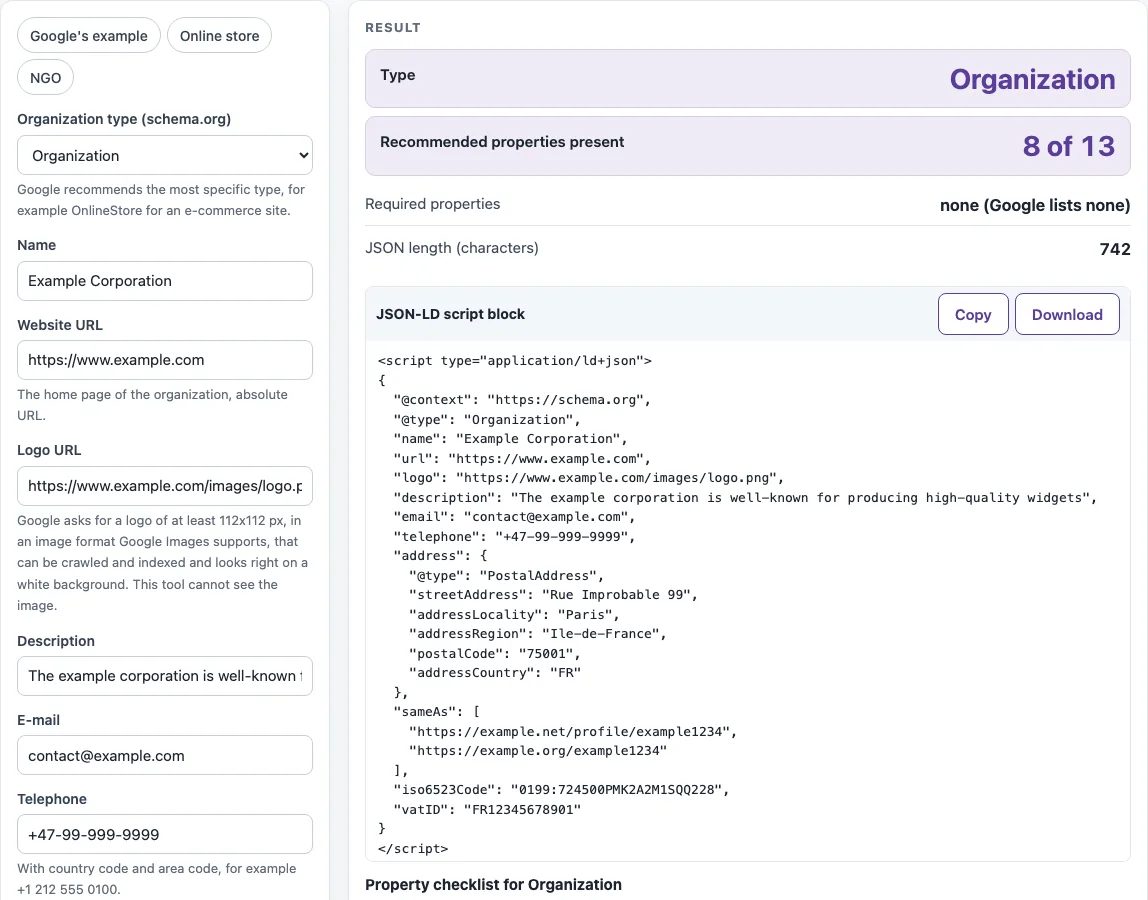
How to use the Organization schema generator
- Pick a preset (Google’s example, Online store or NGO), or leave the form as it is and fill in your own details.
- Set Organization type (schema.org). Choose the most specific type that fits, such as OnlineStore for an online shop.
- Enter Name, Website URL (a full address starting with https://), Logo URL and a short Description.
- Add E-mail, Telephone (with a + and country code), Street address, City, State or region, Postal code and a two-letter Country code.
- Enter Other profiles (sameAs), one link to each official profile of your organization.
- Open More options to add Alternate name, Legal name, Founding date, Number of employees, Contact points and any identifiers you have, such as the DUNS number or LEI code.
- Read the results: Recommended properties present (of 13), Required properties, JSON length (characters), and any errors or warnings.
- Check the Property checklist, then use Copy to take the JSON-LD script block to your clipboard or Download to save it as a file.
Contact points are entered one per line in the form contact type | telephone | e-mail | areas served | languages, with commas between multiple areas or languages. Each line needs a telephone or an e-mail.
What is Organization schema?
Organization schema is structured data, written as JSON-LD, that describes an organization to search engines. It states facts such as the organization’s name, website URL, logo, contact points and profiles.
The vocabulary comes from schema.org, which defines Organization as a type and several more specific subtypes. Corporation, NGO, EducationalOrganization, GovernmentOrganization, MedicalOrganization, NewsMediaOrganization and SportsOrganization are direct subtypes of Organization. OnlineStore is a subtype of OnlineBusiness. Google’s Organization documentation recommends the most specific subtype that fits, so an online shop should use OnlineStore rather than the generic Organization.
Each property states one fact. Name and URL say who you are and where your site lives. The logo property points to an image. The sameAs property lists other pages that represent the same organization, such as official social media profiles. Every value should match what the visible page says, because markup that contradicts the page works against you.
Which properties does Google require?
None. Google’s Organization documentation lists no required properties, but it recommends a longer list, and this tool counts how many of those recommendations your markup includes.
The 13 recommended properties are name, alternateName, legalName, description, url, logo, sameAs, foundingDate, numberOfEmployees, email, telephone, contactPoint and address. Merchant policy properties, such as return policy, shipping and member program, are also recommended by Google, but this tool does not build them.
The Recommended properties present counter shows how many of the 13 your output includes. Google’s example, Example Corporation, reaches 8 of 13 and produces 742 characters. The Online store example with one contact point reaches 5 of 13 and produces 454 characters. A higher count is not a goal in itself. Add the properties that describe your organization, and leave out the ones that do not apply.
Two warnings are worth acting on. An Organization without sameAs gets a warning, and so does a telephone number without a + country code.
Sources (checked 13 October 2026): Google Search Central · schema.org
Worked examples
| Input | Result |
|---|---|
| Organization: Example Corporation | recommended 8 of 13, 742 characters of JSON-LD |
| OnlineStore: Example Shop | recommended 5 of 13, 458 characters of JSON-LD |
| NGO: Example Foundation | recommended 5 of 13, 256 characters of JSON-LD |
Calculated by the tool above; open it with the same values to see each step.
Frequently asked questions
How big must the logo be?
The logo must be at least 112 x 112 px, crawlable and indexable, in a format Google Images supports, and it should look right on a white background. The tool cannot check the size of the image for you, so open the file and confirm it yourself.
Where do I put it?
Place the script block on your home page or your about page. The values in it must match what visitors see on that page.
How do I write the country?
Use the two-letter ISO 3166-1 alpha-2 code, such as FR for France or US for the United States. Enter it in Country code, which becomes addressCountry in the output. Write telephone numbers with the same country’s code, such as +33.
Can I add DUNS or LEI?
Yes. Google prefers the iso6523Code form, so use 0060: followed by your DUNS number, or 0199: followed by your LEI. The tool warns you if you give a DUNS or LEI without an ISO 6523 code.
Which type for an online shop?
Use OnlineStore. Google’s example for e-commerce uses this type, and it is a subtype of OnlineBusiness on schema.org. The Online store preset starts you with it.
Does it guarantee a rich result?
No. Valid markup does not guarantee a rich result or a knowledge panel, and Google does not guarantee that structured data will appear in search results.
Related tools
- Schema markup generator: Use it when you need structured data for a type other than an organization.
- FAQ schema generator: Use it to mark up questions and answers on a page.
- Local business schema generator: Use it when your business has a physical location that customers visit.
- hreflang generator: Use it to tell search engines which language or regional version of a page to show.
- Meta tag checker: Use it to review the title and meta tags on a page you have pasted in.
- Open Graph checker: Use it to review the Open Graph tags that control how your page appears when shared.