Robots.txt Generator
Choose what crawlers may visit to get a ready robots.txt file, with a test of what it blocks.
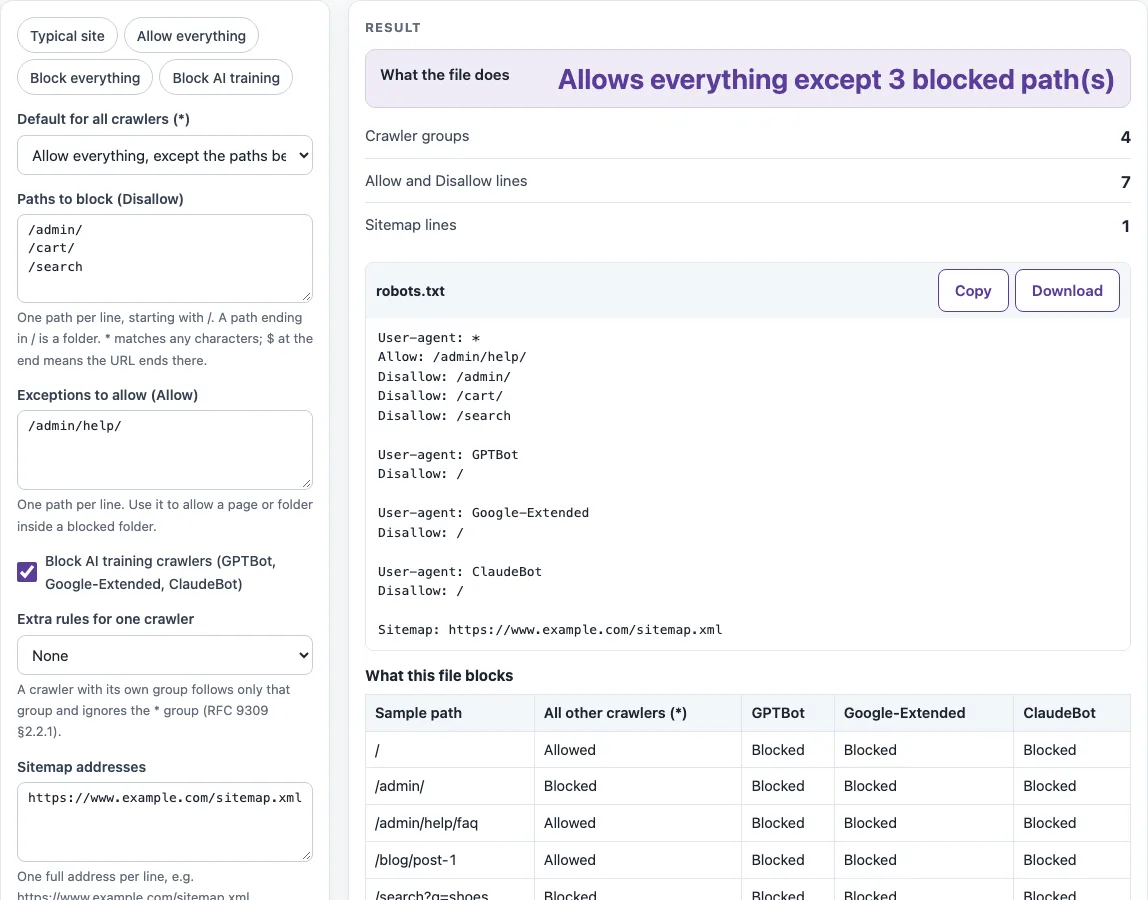
This robots.txt generator builds a robots.txt file from a simple form, so you can create a correctly formatted file without writing the rules by hand. Fill in the paths to block or allow, choose a preset or a crawler rule, and the file text appears in a code block that you can copy or download. It works as a robots txt maker and robots txt builder in one page.
The tool runs in your browser, is free and needs no sign-up. The file is generated on your device with no network call, so the paths you enter are not sent anywhere. Use the preset Typical site as a starting point, Block everything for a full block, or Block AI training to keep AI training crawlers out. Each choice shows up in the result rows, so you can check what the file does before you upload it.
How to use the robots.txt generator
- Pick a preset, such as Typical site, Allow everything, Block everything or Block AI training, or leave the form empty.
- Under Default for all crawlers (*), choose “Allow everything, except the paths below” or “Block the whole site”.
- In Paths to block (Disallow), enter one path per line, such as /admin/.
- In Exceptions to allow (Allow), list paths inside a blocked area that should stay open, such as /admin/help/.
- Tick Block AI training crawlers (GPTBot, Google-Extended, ClaudeBot) if you want those crawlers kept out.
- Optional: under Extra rules for one crawler, pick a crawler, then set What this crawler may not do and Paths to block for this crawler.
- Enter your sitemap address under Sitemap addresses.
- Under More options, add Sample paths to test to see the What this file blocks table.
- Check the robots.txt code block and the result rows, then select Copy or Download.
Each input is a text list with one path or address per line. If you paste a line that starts with “Disallow:” or “Allow:”, the prefix is removed. Empty lines and duplicates are dropped automatically.
Creating a robots.txt this way also checks it: the warnings under the result flag a rule that blocks the whole site, a path without a leading “/”, blocked CSS or JavaScript folders, and a sitemap address that is not a full URL. Upload the finished file to the root of your site, then test a few real URLs with the robots.txt tester.
What should be in a robots.txt?
A robots.txt file is made of groups. Each group starts with one or more User-agent lines that name the crawler the rules apply to, followed by Allow or Disallow lines. Google documents four supported fields: user-agent, allow, disallow and sitemap. Google states that other fields such as crawl-delay are not supported, so the generator writes only these fields.
A crawler follows one group only: the most specific user-agent that matches it. Groups for the same agent are merged, but the * group is not combined with a specific group. A crawler with its own group therefore ignores the * group entirely. If you add an extra rule for Googlebot, repeat any path that Googlebot must still respect in that group.
When rules conflict, the most specific rule wins, which means the one with the longest path. Allow wins a tie. Paths are case-sensitive, while field names and user-agent values are not. The character “*” matches any characters, and “$” at the end of a path anchors it to the end of the URL, as set out in RFC 9309. Google reads at most 500 KiB of the file and ignores the rest. An empty “Disallow:” line blocks nothing.
How to create robots txt for website
A robots.txt is a plain text file that tells crawlers which URLs they may fetch, as described in RFC 9309. The generator builds it from your form and writes the lines in a fixed order: the * group first, with its Allow lines and then its Disallow lines. After that come the extra crawler group, then the GPTBot, Google-Extended and ClaudeBot groups, and the Sitemap lines last.
The file controls crawling, not indexing. Google says robots.txt is not a mechanism for keeping a web page out of Google, and a blocked URL can still appear in results without a description. Use robots.txt to control which URLs crawlers fetch. For pages that must stay out of search, use a noindex rule or password protection instead.
Sources (checked 13 October 2026): RFC 9309 · OpenAI crawler docs · Google Search Central · Common Crawl · Perplexity crawler docs
Worked examples
| Input | Result |
|---|---|
| Blocks /admin/, /cart/, /search. AI training crawlers blocked. | 4 groups, 7 rules |
| Whole site blocked. | 1 groups, 1 rules |
| Blocks /tmp/. | 2 groups, 2 rules |
Calculated by the tool above; open it with the same values to see each step.
Frequently asked questions
How do I block all crawlers?
Choose “Block the whole site” under Default for all crawlers (*). The file then contains “Disallow: /”, and any Allow exceptions you added are kept. A live site with this rule will also be hidden from search crawling, so use it only when that is what you want.
How do I block AI crawlers?
Tick Block AI training crawlers (GPTBot, Google-Extended, ClaudeBot) or choose the Block AI training preset. This adds a group for each of those three crawlers. It only works for crawlers that follow robots.txt, and Google-Extended does not affect inclusion in Google Search.
Does robots.txt remove a page from Google?
No. Robots.txt controls crawling, so a page that must stay out of results needs a noindex rule or password protection. You can check a page’s noindex setting with the Noindex checker.
Does Google support crawl-delay or noindex in robots.txt?
No. Google’s documentation lists only user-agent, allow, disallow and sitemap, and it names crawl-delay as unsupported. The generator drops a noindex line because it is not a field that Google’s documentation lists as supported.
Where do I put robots.txt?
Put it at the top level of the host, so the address is /robots.txt. Subdomains and other protocols need their own file, so a blog on its own subdomain needs a separate robots.txt on that subdomain.
Can I test the file before uploading it?
Yes. Enter sample paths under Sample paths to test, and the What this file blocks table shows whether each path is blocked for the * group and for each crawler group. The table uses the same RFC 9309 matching rules as the tester.
Related tools
- robots.txt tester: Use it to check whether specific URLs are allowed under a set of robots.txt rules.
- robots.txt examples: Use it to compare your file with sample setups for common site types.
- Sitemap finder: Use it to find the sitemap address you need under Sitemap addresses.
- Noindex checker: Use it when a page must stay out of search and you want to check its noindex setting.
- XML sitemap generator: Use it when you do not have a sitemap yet and want to create one.
- Sitemap validator: Use it to check a sitemap file’s structure before you list it in robots.txt.