Robots.txt Tester
Fetch a site's robots.txt, or paste one, and test which URLs a crawler may visit.
How this check works: our server sends one ordinary GET request per redirect step (at most 10) to the public address you enter, the same request a browser would make, and shows you a short summary — status codes, selected response headers and, for robots.txt, the file itself (up to 64 KB). It never sends data on your behalf, never contacts private or internal addresses, and does not log or store what you type; results are cached for 10 minutes and each visitor can run 10 checks per minute.
The robots.txt tester checks whether a specific crawler is allowed to request a URL under a site’s robots.txt file. Enter a site address and fetch its file, or paste your own text, choose a crawler such as Googlebot or bingbot, and list the URLs or paths you want to check. It works as an online robots txt tester and robots txt testing tool, and it is free with no sign-up.
Pasted text is processed in your browser and never sent anywhere. A fetch sends only the web address to this site’s own read-only check service, which allows 10 checks a minute and caches results for 10 minutes without storing them. The tester also lists validation messages for the file, so you can spot syntax problems alongside the allow and block results.
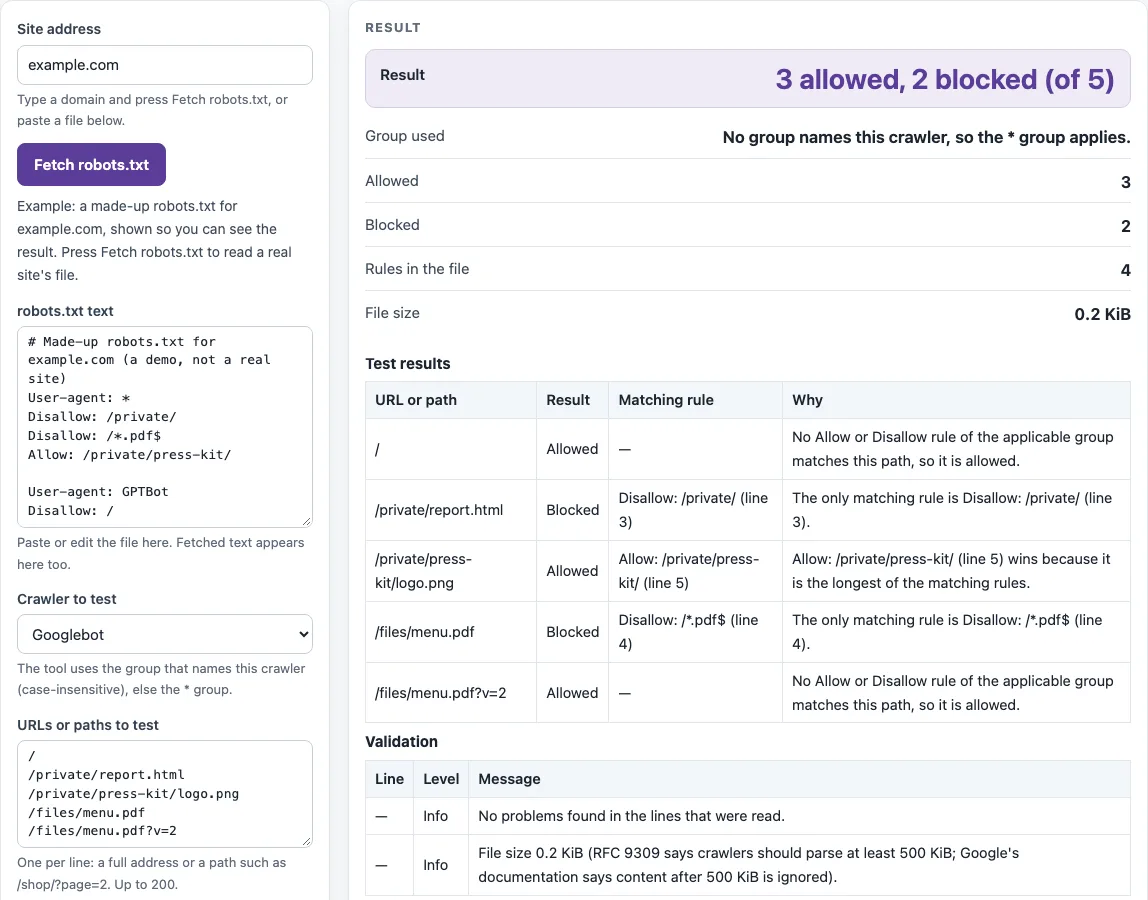
How to use the robots.txt tester
- Enter your domain in “Site address” and press “Fetch robots.txt”. The text appears in “robots.txt text”. You can also paste your file straight into that box.
- Pick a “Crawler to test”. Choose “Any other crawler (*)”, “Googlebot”, “bingbot”, “GPTBot” and others from the list, or type another crawler name.
- Type your “URLs or paths to test”, one per line, up to 200. Full URLs are reduced to path and query, so either format works.
- Read the “Result” line, for example “3 allowed, 2 blocked (of 5)”. Then check “Group used”, “Rules in the file” and “File size”.
- In “Test results”, find each URL’s Allowed or Blocked status. The Matching rule column gives the rule type, path and line number, and Why explains the decision.
- Open the “Validation” table and review any line marked Error or Warning.
The page opens with a made-up example for example.com, using Googlebot and five paths, so you can see a full result before testing your own file. If you edit the text after a fetch, the stored fetch status is removed, because it described the original text.
If you edit the fetched text in the box, the result switches to your edited copy and stops quoting the live status, so you can try a rule change safely before you upload it.
Is my page blocked by robots.txt?
A page is blocked when the most specific matching rule for your crawler is a Disallow. The tester first chooses one group. All groups naming the crawler’s product token are merged, matched case-insensitively. If there are none, it uses the * groups. If there are none of those, no rules apply. A crawler uses only one group, and a specific group beats *.
Within that group, paths are matched from the first character and are case-sensitive. Google’s documentation gives these examples: /fish matches /fish, /fish.html and /fishheads, but not /Fish.asp or /catfish. /fish/ matches only inside that folder. /*.php$ does not match /filename.php?parameters, because $ anchors the end of the URL.
When several rules match, the longest matching path wins. If an Allow and a Disallow are equally long, Allow wins. If nothing matches, the URL is allowed, and /robots.txt is always allowed (RFC 9309 §2.2.2). A “Blocked” result means a crawler that obeys robots.txt will not fetch the URL. It does not mean the URL cannot appear in search results from links elsewhere.
Does the order of rules matter?
No. The position of a rule in the file does not decide the outcome, because the longest matching path wins (RFC 9309 §2.2.2). A longer Allow can override a shorter Disallow even when it appears later in the file.
The example on the page shows this. Line 3 is Disallow: /private/, and line 5 is Allow: /private/press-kit/. The path /private/report.html is blocked by line 3. The path /private/press-kit/logo.png is allowed by line 5, because that match is longer. Reading the Matching rule column tells you which line won for each URL.
Sources (checked 13 October 2026): RFC 9309 · Google Search Central
Worked examples
| Input | Result |
|---|---|
| Googlebot, 5 URLs | 3 allowed, 2 blocked (of 5) |
| GPTBot, 2 URLs | 0 allowed, 2 blocked (of 2) |
| *, 2 URLs | 2 allowed, 0 blocked (of 2) |
Calculated by the tool above; open it with the same values to see each step.
Frequently asked questions
What happens if robots.txt returns 404?
A 4xx answer means the file is unavailable, and crawlers may access any resource (RFC 9309 §2.3.1.3). Google’s documentation says that 4xx responses, except 429, are treated as if no robots.txt file exists.
What happens if it returns 500?
A 5xx answer or an unreachable server means crawlers must assume complete disallow (RFC 9309 §2.3.1.4). Google’s documentation says it stops crawling for the first 12 hours, keeps retrying, and for up to 30 days uses the last good copy of the file.
Can the tester check Googlebot-Image?
Yes, if you type that exact token under “Crawler to test”. The tester does not know Google’s crawler hierarchy, so it will not work out which Google crawler falls back to Googlebot. It matches only the name you enter.
Does it show the 500 KiB limit?
Pasted text is measured in bytes, and the Validation table flags a file over 500 KiB, since only the first 500 KiB is read. Fetched text cannot be tested against that limit, because the check service returns at most 64 KB.
Why is my Allow rule not working?
A longer Disallow rule may be winning, since the longest matching path decides. Also check capitalization, because paths are case-sensitive: /Press-Kit/ does not match /press-kit/. The Matching rule column shows which line applied.
Is this the Google robots txt tester?
No. This tool is not Google’s own tester. It applies the public rules from RFC 9309 and Google’s documentation. Results use your pasted text or the file our server saw at that moment, and a real crawler may hold an older copy, since RFC 9309 §2.4 says a cached copy should not be used for more than 24 hours unless the site is unreachable.
Related tools
- Robots.txt generator: use it to build a robots.txt file from scratch before you test it here.
- Robots.txt examples: use it to compare your rules with common patterns.
- Sitemap finder: use it to locate the sitemap URLs your robots.txt should point to.
- Noindex checker: use it when a page is allowed to crawl but you also need to check for a noindex directive.
- XML sitemap generator: use it to create a sitemap file to reference from robots.txt.
- Sitemap validator: use it to check that a sitemap file is well formed after you publish it.