Schema Markup Generator
Pick a type and fill in the fields to get JSON-LD structured data, or paste markup to check it.
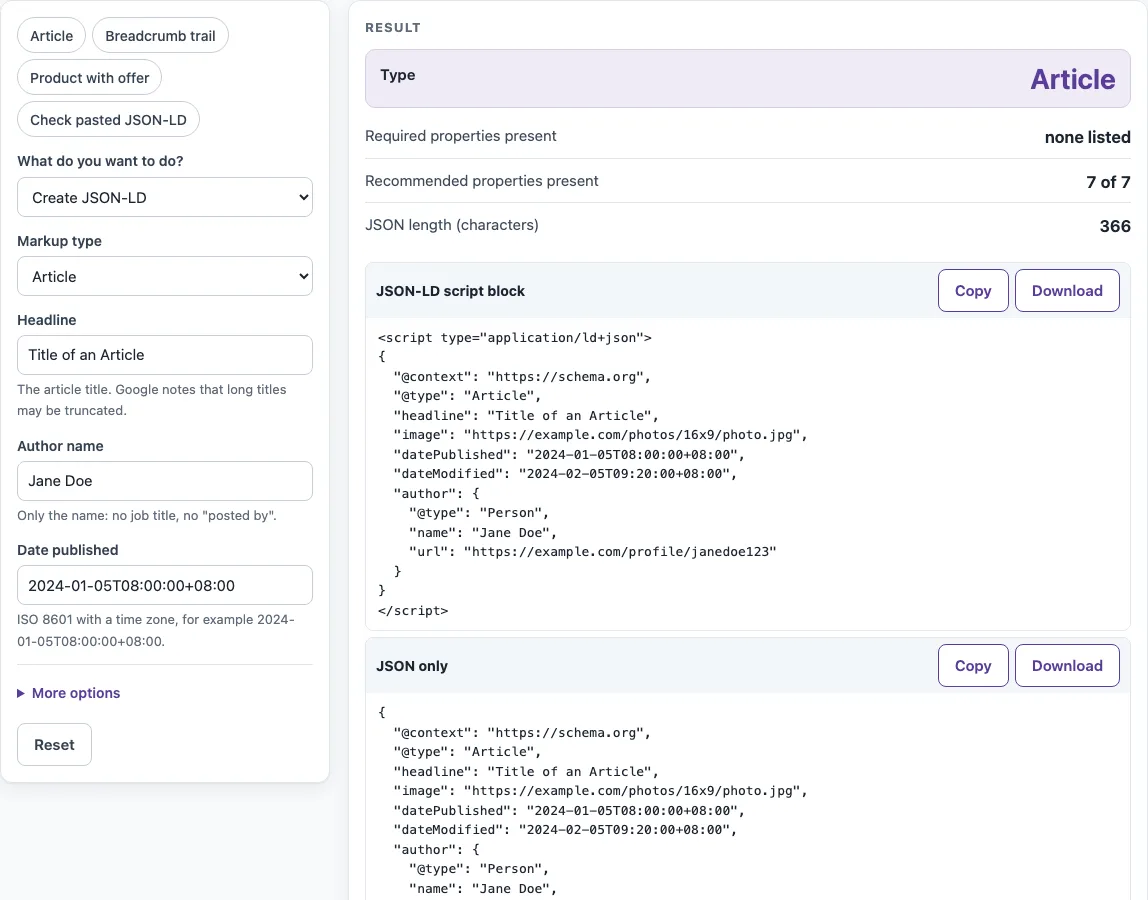
How to use the schema markup generator
- Under “What do you want to do?”, keep “Create JSON-LD” selected. To review code you already have, choose “Check pasted JSON-LD” instead.
- Pick a type in “Markup type”, or start from a preset: Article, Breadcrumb trail, Product with offer or Check pasted JSON-LD.
- Fill in the fields shown for that type. For Article these are Headline, Author name and Date published. Fields for other types stay hidden.
- Open “More options” for optional fields such as Image URLs, Date modified or Author URL. Empty fields are left out of the JSON.
- Read “Required properties present” and “Recommended properties present”. If a value breaks a rule, the page shows an error naming the field. Correct it and check again.
- Go through the “Property checklist for
<type>” table. Each row shows a Status of Present, Missing or Check value. - Use Copy or Download under “JSON-LD script block”. Use the “JSON only” block when you want the JSON without the script tag.
For a BreadcrumbList, enter the “Breadcrumb trail” with one level per line. Write each line as a name, then a pipe character, then the page address. Only the last line may be a name alone. Positions are numbered 1, 2, 3 in line order, so list the top level first.
What is a schema markup generator?
A schema markup generator is a form that writes JSON-LD for a page from the values you type in. The output uses the vocabulary of schema.org, and each type has properties that Google’s documentation marks as required or recommended.
Required and recommended mean different things. Items missing required properties are not eligible for rich results. Recommended properties improve the result when they are present. The checklist separates the two, so you can see which gaps matter most.
Two rules apply to every value. The markup must be a true representation of the page, and it must not mark up content that readers cannot see. Every URL must be absolute, including the scheme, such as https://. Every date must use ISO 8601. A price is a plain number, and a currency is three capital letters, such as USD.
Two schema markup examples show how the counts work. An Article has no required properties, so “Required properties present” reads “none listed”. With the Article defaults, “Recommended properties present” reads “7 of 7” and the JSON is 366 characters. The Event example, based on Google’s sample, reads “4 of 4” for required properties, but “11 of 12” for recommended, because no image is set.
Which format does Google recommend?
Google recommends JSON-LD among its three supported formats, which are JSON-LD, Microdata and RDFa. JSON-LD keeps the data in one script block, so it does not have to be woven through the visible HTML of the page.
Place the script block on the page it describes, in the head or the body. Because the block is code, the generator protects it. Any </ inside a string is written as <\/, so a value containing </script> cannot end the script element early. A <!-- is written as \u003c!--, for the same reason.
Dates need care for events. With no time zone offset, Google uses the time zone of the event location. Use a date alone only for an all-day event. Never enter T00:00 with +00:00 as a placeholder, because it states a time that is not true.
Sources (checked 13 October 2026): Google Search Central · schema.org
Worked examples
| Input | Result |
|---|---|
| Article: Title of an Article | Article, required: none listed, 366 characters of JSON-LD |
| BreadcrumbList: 3 items | BreadcrumbList, required: 5 of 5, 462 characters of JSON-LD |
| Event: The Adventures of Kira and Morrison | Event, required: 4 of 4, 1087 characters of JSON-LD |
| Product: Executive Anvil | Product, required: 7 of 7, 734 characters of JSON-LD |
| WebSite: Example | WebSite, required: 2 of 2, 114 characters of JSON-LD |
Calculated by the tool above; open it with the same values to see each step.
Frequently asked questions
Does valid schema markup guarantee rich results?
No. Google says it does not guarantee that structured data appears in search results. Valid JSON with every required property makes an item eligible, but it does not promise that a result will show.
Are star ratings added automatically?
No. The rating and review fields in Product start empty, and nothing is written unless you type a value. Enter only ratings and reviews that the page really shows to readers.
Can I check JSON-LD I already have?
Yes. Choose “Check pasted JSON-LD” under “What do you want to do?” and paste the JSON, with or without the script tag. A paste with a trailing comma, for example, returns “JSON syntax errors: 1” with the line and column of the comma.
Which properties are required for an Event?
An Event needs a name, a startDate and a location with an address. In the form, these are Event name, Start, and the address fields: Street address, City, State or region, Postal code and Country code.
Does this tool build FAQ or HowTo markup?
No. Google removed the HowTo rich result in September 2023 and the sitelinks search box in November 2024, and it stopped showing FAQ rich results in May 2026. This page builds none of them, and the WebSite type never adds a SearchAction. FAQPage markup itself is still a valid schema.org type; the FAQ schema generator builds it and explains the change.
Is my pasted JSON-LD sent anywhere?
No. Pasted text is processed in your browser and is never sent. Everything runs in the browser with no network call.
Related tools
- FAQ schema generator: use it when you want to write FAQ markup for a page’s visible questions and answers.
- Local business schema generator: use it for a local schema markup generator job, such as marking up a shop or office with its address and opening details.
- Organization schema generator: use it to describe a company or organization that runs the site.
- hreflang generator: use it to write hreflang link tags for pages that exist in several languages or regions.
- Meta tag checker: use it to review the title and description tags on a page you have pasted.
- Open Graph checker: use it to review the Open Graph tags that control how a shared link looks.