SEO Audit Template
Mark each check as done, needs work or not applicable to get a score and a report.
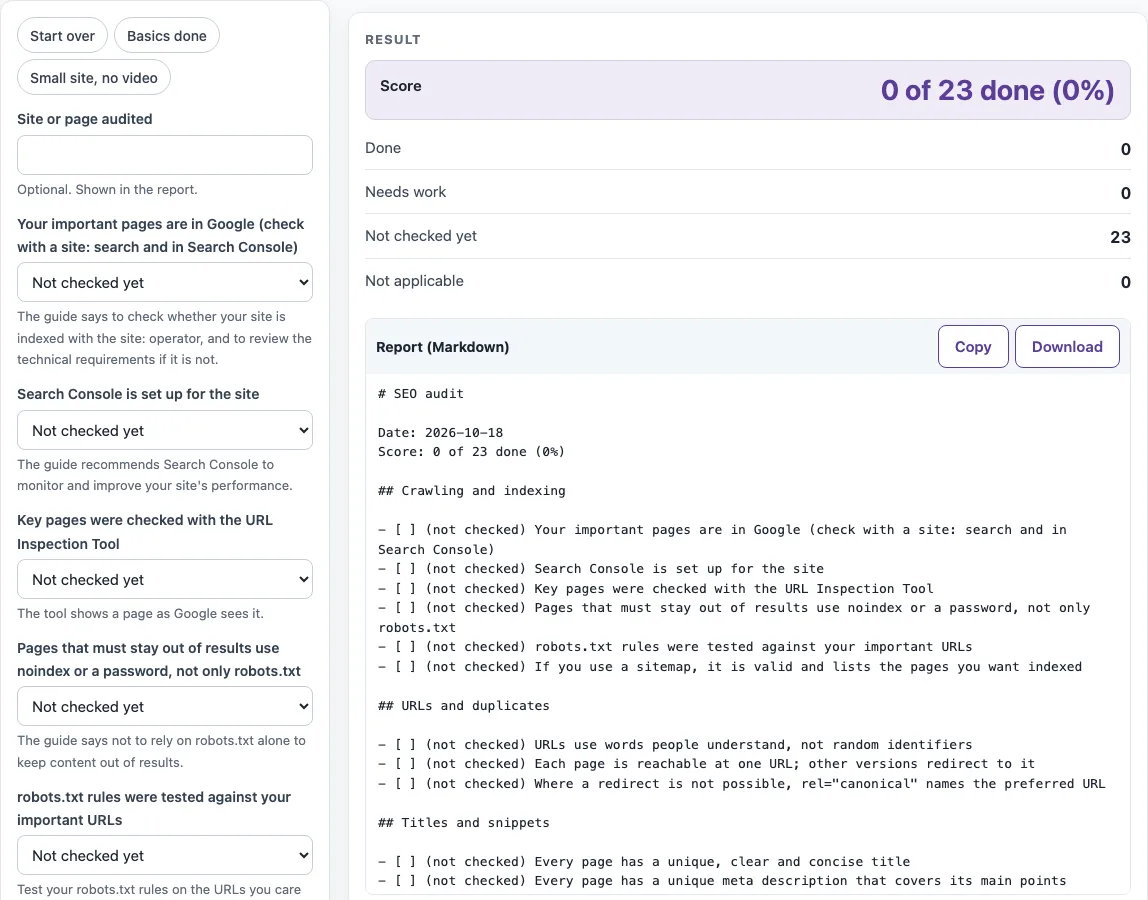
How to use the SEO audit template
- Type the site or page name into “Site or page audited”. This is optional, but it appears in the report title.
- Work through the six groups. For each of the 23 checks, open its status select and choose Done, Needs work or Not applicable. Every check starts as Not checked yet.
- Watch the Score and the counts of Done, Needs work, Not checked yet and Not applicable as you change statuses.
- The Tool on this site column of each table names a tool that helps with that check. For any check you cannot confirm yet, use it to test the page, then set the status.
- Open the list “Open checks you can test with a tool on this site” to jump to those tools for the checks that are still Needs work or Not checked yet.
- Copy the Markdown from the “Report (Markdown)” code block, or select Download to get seo-audit-report.md.
The preset chips (Start over, Basics done, Small site and no video) save clicks. Start over clears your answers so you can begin again.
For a website audit report PDF, select Print / save as PDF. This opens your browser’s print dialog with your inputs, score and tables. Choose Save as PDF there. Copy link puts your answers into the page address, so you can reopen the same audit later. Nothing is stored on a server.
What should an SEO audit include?
An SEO audit looks at whether search engines can find, read and index your important pages, and at how each page’s address, title, description, content, links and media are set up. This template covers those areas in six groups: crawling and indexing (6 checks), URLs and duplicates (3), titles and snippets (4), content (4), links (3), and images, video and data (3). Most checks follow the Google Search Central Search Engine Optimization (SEO) Starter Guide. The Open Graph share tags check comes from ogp.me.
Each group answers a basic question. Crawling and indexing asks whether your key pages appear in Google and whether your sitemap, robots.txt and noindex settings do what you intend. Keep in mind that the guide says not to rely on robots.txt alone to keep content out of results. URLs and duplicates asks whether each page has one address and whether other versions redirect to it. Titles and snippets asks whether titles and descriptions are unique, clear and free of keyword stuffing. Content asks whether pages are easy to read, original and kept up to date. Links asks whether pages link to related and trusted pages using descriptive text. The last group asks whether images have descriptive alt text, videos sit on their own pages and structured data is valid.
How is the score worked out?
The score is the number of checks marked Done, divided by the number of checks that are not marked Not applicable, rounded to a whole percent. Checks left as Not checked yet count as not done, so the score rises only as you confirm checks.
For example, if 5 checks are Done and 3 are Not applicable out of 23, the score is 5 of 20 done (25%). The 3 Not applicable checks are removed from the total. If only 3 checks are Done and none are Not applicable, the score is 3 of 23, or 13%. If every check is Not applicable, there is nothing to divide by, so the page asks you to change at least one status.
The score reflects your own answers to the checklist. It does not measure how well your site ranks.
Sources (checked 18 October 2026): SEO Starter Guide, Google Search Central · The Open Graph protocol
Worked examples
| Input | Result |
|---|---|
| example | 0 of 23 done (0%) |
| example.com | 3 of 22 done (14%) |
| example | 23 of 23 done (100%) |
Calculated by the tool above; open it with the same values to see each step.
Frequently asked questions
How do I make an SEO audit report as a PDF?
Fill in the checks, then select Print / save as PDF. In the browser’s print dialog, choose Save as PDF. The printed output includes your inputs, score and tables.
Can I save my answers?
Yes, use Copy link. It puts your answers in the page address, so you can reopen the same audit later. Nothing is stored on a server, so keep the link if you want to come back to it.
What does this audit leave out on purpose?
It leaves out the meta keywords tag, content length, heading order and count, domain keywords, TLD choice, and subdomain versus subdirectory. The Google guide lists these as things not to focus on. It also does not check site speed, mobile layout or JavaScript rendering, because the guide gives no specific guidance on them.
Does the tool check my site automatically?
No. It does not crawl your site and cannot tell whether a check is true. You set each status yourself. The linked tools on this site can help you test individual checks.
Is this SEO audit template free?
Yes. It is a free browser-based tool. Everything runs in your browser, and nothing you enter is sent anywhere.
Related tools
- Meta tag generator — Build the title, description, robots and share tags for a page.
- Title tag length checker — Count the characters in a title and estimate its width.
- Meta description length checker — Count the characters in a description and estimate its width.
- Canonical tag checker — Check the canonical link of a page.
- Noindex checker — Check whether a page carries a noindex rule.
- Robots.txt tester — Test a URL against robots.txt rules.
- Sitemap checker — Check a sitemap file.
- Internal link checker — Check the links on a page.
- Schema markup generator — Build JSON-LD structured data for a page.