Sitemap Finder
Enter a website to find the sitemaps its robots.txt lists and the usual places to look.
How this check works: our server sends one ordinary GET request per redirect step (at most 10) to the public address you enter, the same request a browser would make, and shows you a short summary — status codes, selected response headers and, for robots.txt, the file itself (up to 64 KB). It never sends data on your behalf, never contacts private or internal addresses, and does not log or store what you type; results are cached for 10 minutes and each visitor can run 10 checks per minute.
How to use the Sitemap finder
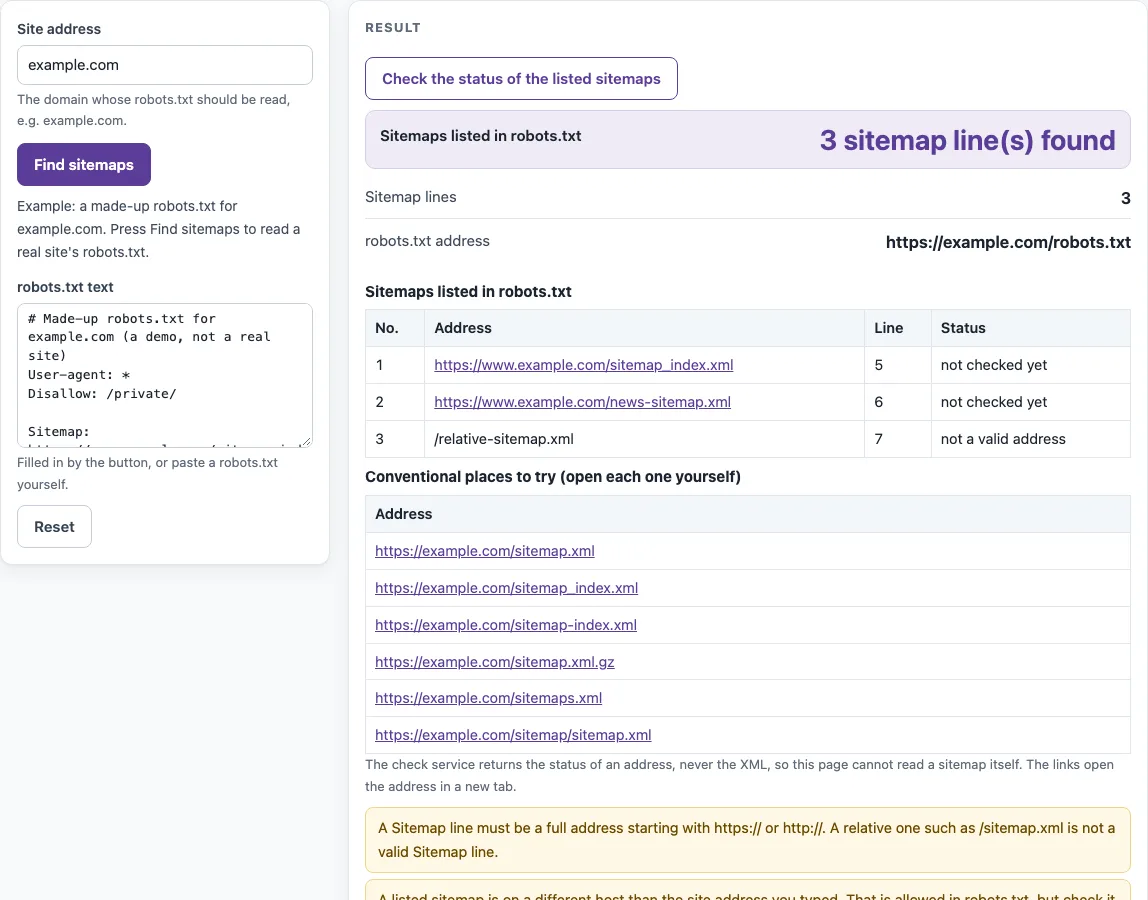
- Type the website’s address in Site address, for example https://example.com.
- Press Find sitemaps. The result line under Sitemaps listed in robots.txt says either “N sitemap line(s) found” or “No Sitemap line found”.
- Read the table Sitemaps listed in robots.txt. It shows No., Address as link, Line and Status for each Sitemap line.
- Press Check the status of the listed sitemaps to fill the Status column. It checks up to 5 listed absolute addresses.
- If no Sitemap line is found, open the links in Conventional places to try (open each one yourself). The tool does not check these for you.
- To use a robots.txt you already have, paste it into robots.txt text and run the search again.
The result rows also show robots.txt address and Sitemap lines. Status checks are limited to 10 per minute per visitor, so wait a minute if you hit the limit. If the static preview is shown, the live check is unavailable, but pasting robots.txt text still works.
Each status check counts against the limit of 10 checks a minute, and the robots.txt fetch counts once. A sitemap address that redirects is shown with the address it ends at, so you can update the Sitemap line in robots.txt to point at it directly.
How do I find a website’s sitemap?
Look for Sitemap lines in the site’s robots.txt file, at /robots.txt on the site’s host. If there are none, try common addresses such as /sitemap.xml and /sitemap_index.xml, and check the site’s own settings.
Where is my sitemap?
On your own site, the answer is the same: read your robots.txt and try the common addresses. Your content management system may also show the sitemap address in its settings, and that address is the one to use.
Why is there no sitemap in robots.txt?
A Sitemap line in robots.txt is optional. The sitemap may exist without one, or it may have been submitted directly in the search engine’s site owner tools. The finder shows a warning in this case so you know the file alone does not tell the full story.
Does the finder read the sitemap?
No. The finder reads robots.txt and reports the status of addresses. The check service never returns XML, so the page cannot say whether a sitemap file is valid. To check sitemap text, use the sitemap validator.
Is /sitemap.xml always the sitemap?
No. It is a common name that some systems use, but it is not a standard, and a search engine does not look there by rule. A sitemap can be hosted at any address, and a Sitemap line in robots.txt gives its full address, which is the reliable source.
How do I tell search engines about my sitemap?
Add a Sitemap line with the full, absolute address to your robots.txt file, and/or submit the sitemap in the search engine’s site owner tools. Google’s documentation lists both options. Under the sitemaps.org protocol a sitemap file may only list URLs in its own folder and below, which is why sitemaps usually sit at the site root.
Sources (checked 13 October 2026): RFC 9309 · sitemaps.org
Worked examples
| Input | Result |
|---|---|
| example.com | 3 sitemap line(s) found |
| example.com | No Sitemap line found |
| example.com | No Sitemap line found |
Calculated by the tool above; open it with the same values to see each step.
Frequently asked questions
What does “200: the address answers” mean?
It means the address responded successfully. It does not prove the address contains a sitemap, so open the link to see its content.
Can a robots.txt list more than one sitemap?
Yes. RFC 9309 allows several Sitemap lines, and large sites often list a sitemap index or several sitemaps. The finder lists every Sitemap line it finds, with its line number, and checks up to 5 of them.
Why does a listed sitemap redirect or return 404?
The site moved or renamed the file but did not update robots.txt. A redirect usually still works for crawlers, but a 404 means the line points nowhere. Update the Sitemap line to the current full address.
Can I check a site that blocks robots.txt?
If robots.txt cannot be fetched, the finder says so, and you can still paste the file’s text into robots.txt text if you have it, or open the conventional addresses yourself.
Is the site I enter stored?
No. Only the address is sent to this site’s read-only check service, results are cached for 10 minutes, and nothing is stored. The tool is free and needs no sign-up.
Can a Sitemap line point to another host?
The finder lists every Sitemap line exactly as written, wherever it points. Whether a search engine accepts a sitemap on another host is up to that search engine, so check its documentation if your sitemaps live elsewhere.
Related tools
- XML sitemap generator: Use it when your site does not have a sitemap yet and you need to create one.
- Sitemap validator: Use it to check sitemap text you paste in, since the finder cannot read XML.
- robots.txt generator: Use it to write a robots.txt file with a Sitemap line.
- Hreflang generator: Use it to build hreflang annotations for pages available in several languages.
- Broken link checker: Use it to look for broken links on a page you paste in.
- Redirect checker: Use it to follow the redirects on an address.