Sitemap Checker and Validator
Paste a sitemap or open the file to check it against the sitemap protocol, with line numbers.
This sitemap checker and validator reads an XML sitemap and reports errors, warnings and file details, so you can fix problems before you publish the file. It works as a sitemap validator for both URL sitemaps (urlset) and sitemap indexes (sitemapindex). Paste your XML or load a file, and the check runs in your browser. It is free and needs no sign-up.
Nothing is uploaded. The tool checks XML syntax and sitemap rules, and it reports each problem with its line number. It does not visit your pages, so a clean result confirms the file is well formed and follows the sitemap rules. It does not confirm that every listed address works.
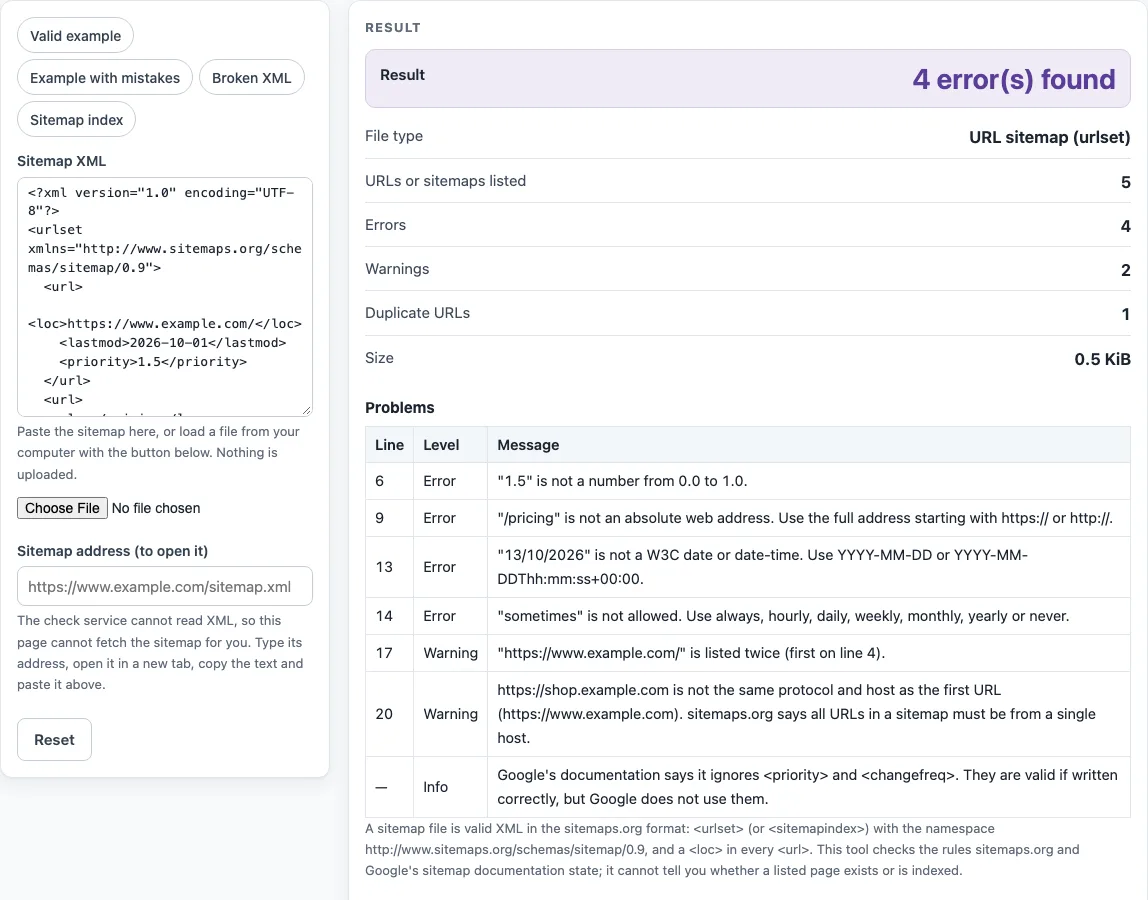
How to use the Sitemap validator
- If your sitemap is online, enter its address in “Sitemap address (to open it)” and press “Open the sitemap in a new tab”. The tool cannot fetch the file itself, so copy the XML text from that tab.
- Paste the XML into “Sitemap XML”. Or press the file button, “Load a sitemap file”, to read a file from your computer. Unzip .gz files first, because the tool refuses them.
- To try the tool first, choose a preset: “Example with mistakes”, “Valid example”, “Broken XML” or “Sitemap index”.
- Read “Result”. It shows “No problems found”, “Valid, with N warning(s)” or “N error(s) found”.
- Check “File type” to confirm whether the file is a URL sitemap (urlset), a sitemap index (sitemapindex) or “Not a sitemap”.
- Review “URLs or sitemaps listed”, “Errors”, “Warnings”, “Duplicate URLs” and “Size”.
- Open the “Problems” table. Each row shows the Line, the Level (Error, Warning or Info) and a Message. Fix the errors first, then the warnings, and paste the corrected XML again.
The Problems table lists up to 500 rows. Pasting again after each round of fixes shows whether the Result has changed.
The problems table lists each problem with its line number, and the counts at the top tell you how many entries the file holds, so you can compare them with the number of pages you expected.
How do I check my sitemap is valid?
Paste the sitemap into the tool and read the Result. A valid sitemap is well-formed XML that follows the sitemaps.org protocol, which sets the rules for the root element, the namespace and each entry.
- The file is UTF-8 XML with one root element, either urlset or sitemapindex. Well-formedness follows the XML 1.0 rules.
- Each URL sits in a
<url>entry with a<loc>. The loc must be absolute, entity-escaped and under 2,048 characters, and all URLs in one sitemap come from one host. - Each entry can include a
<lastmod>that uses a W3C datetime format, such as 2026-10-13 or 2026-10-13T09:30:00+01:00. - A sitemap lists at most 50,000 URLs and is at most 52,428,800 bytes (50 MB) uncompressed.
What do the line numbers mean?
Every problem in the table names the line of your pasted text where the tool found it, so you can jump straight to it in your editor. Errors break the file for a parser or break a protocol rule, such as a missing loc, a relative URL or more than 50,000 entries. Warnings point to things that are allowed but worth a look, such as duplicate URLs, a URL on another host, or lastmod dates in the future.
Why does it say bare ampersand?
In XML, the & character starts an entity reference, so a raw & inside a URL breaks parsing. Write & as & in every URL. The only predefined entities are &, <, >, ", ' and numeric references, so any other name after & is reported as an unknown entity. For example, write https://example.com/shop?size=2&color=red in the file. A URL that still contains an entity after decoding is flagged as a double-escaped warning.
Sources (checked 13 October 2026): sitemaps.org · W3C · Google Search Central
Worked examples
| Input | Result |
|---|---|
| URL sitemap (urlset) | No problems found |
| URL sitemap (urlset) | 4 error(s) found |
| URL sitemap (urlset) | 2 error(s) found |
| Sitemap index (sitemapindex) | No problems found |
Calculated by the tool above; open it with the same values to see each step.
Frequently asked questions
What is the sitemap size limit?
A sitemap can list up to 50,000 URLs and can be up to 52,428,800 bytes (50 MB) uncompressed. Each sitemap in a sitemap index has the same limits, and the index has its own limits too. The tool reports the file in “Size” and flags any entry count or file size over the limit as an error.
Can it fetch my sitemap URL?
No. The check service never returns XML, so the tool cannot load a sitemap from its address. Enter the address in “Sitemap address (to open it)”, press “Open the sitemap in a new tab”, copy the text and paste it into “Sitemap XML”.
Does valid mean indexed?
No. A “No problems found” result means the file follows the sitemap rules. The tool does not check whether listed pages exist, redirect or are indexed. Check each page’s status separately.
What is the right namespace?
The root element should declare the sitemaps.org namespace: xmlns=“http://www.sitemaps.org/schemas/sitemap/0.9". A missing or wrong namespace is reported as an error. Extension tags need their own namespace declared, such as the video and news sitemap namespaces, or xhtml for xhtml:link, and they are valid in a URL sitemap when declared.
Is a sitemap index valid with url tags?
No. A sitemapindex lists child sitemaps with <sitemap> entries, each containing a <loc>. A <url> entry belongs in a urlset. The tool reports a <url> inside a sitemapindex as an error, and it reports a <sitemap> inside a urlset as an error too.
Does the tool send my sitemap anywhere?
No. Pasted text and loaded files are processed in your browser and are not sent to a server. The tool is free and needs no sign-up.
Related tools
- Robots.txt generator: create a robots.txt file when you need to tell crawlers which paths to skip.
- Robots.txt tester: check how a robots.txt file applies to specific paths.
- Robots.txt examples: compare sample robots.txt files before you write your own.
- Sitemap finder: look for the sitemap location of a site when you do not know it.
- Noindex checker: check whether a page carries a noindex instruction.
- XML sitemap generator: build a new sitemap file to validate here.