Title Tag Length Checker
Type or paste page titles to see their length, estimated width and a result preview.
The title tag length checker is a title tag checker that counts the characters, words, and estimated pixel width of a page title, so you can see whether it may be shortened in search results. It also works as a meta title checker for one title or a whole list. The tool runs in your browser, is free, and needs no sign-up. Nothing you type is sent anywhere.
Google documents no fixed character limit for titles, so the tool does not give a pass or fail verdict on length. Instead, it estimates the width of your title in Arial 20 px, compares it with an assumed width of 600 px, and shows a preview of where the title may be cut. Use it for a quick meta title length check before you publish, or switch to bulk mode to check several titles at once and spot repeats.
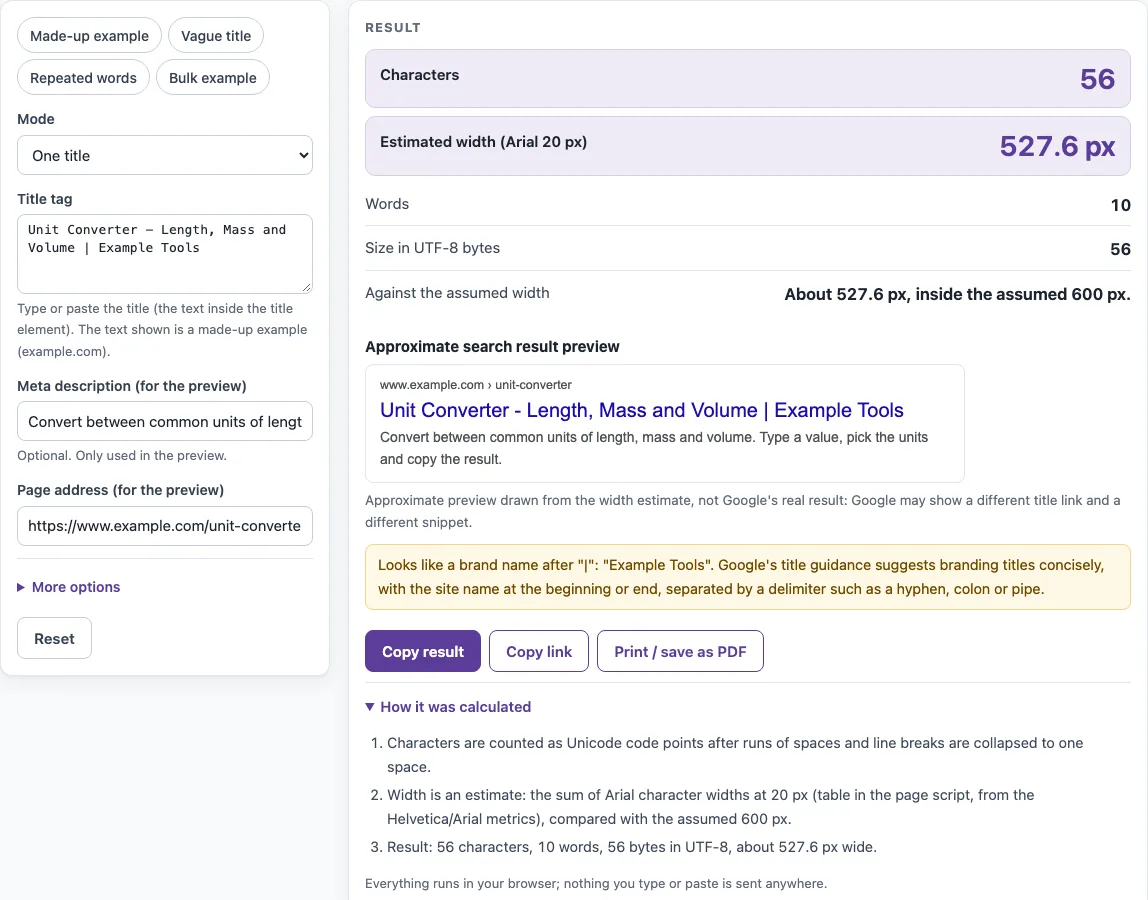
How to use the Title tag length checker
- Keep “Mode” on “One title” for a single page, or choose “Bulk: one title per line” for a list.
- In single mode, type or paste your page title into “Title tag”.
- Optional: fill in “Meta description (for the preview)” and “Page address (for the preview)” to make the preview look more like a search result.
- Open “More options” to see “Assumed title width (px)”. The default is 600. This is an assumption, not a Google figure, so change it only for a specific reason.
- Read Characters, Estimated width (Arial 20 px), Words and Size in UTF-8 bytes. Then check Against the assumed width and the notes.
- Look at the Approximate search result preview to see where the title may be cut.
- For a list, paste up to 500 titles, one per line. Blank lines are skipped.
- Read the table (Line, Characters, Words, Est. width (px), Notes, Title), then the summary: Titles checked, Wider than the assumed width, Repeated titles and Widest title.
The presets “Made-up example”, “Vague title”, “Repeated words” and “Bulk example” load sample input, so you can see what each kind of note looks like before you use your own titles. Change the assumed width under More options if you want to compare against a different screen.
What is the title tag character limit?
Google documents no character limit for a title element, and the HTML standard sets no length rule either. What matters is the space the title takes up on screen. Google may shorten the title link in search results as needed, typically to fit the device width, so a long title can be cut off. Use the estimated width, not the character count, to judge that risk.
The estimate adds up the width of each letter in Arial. Letters differ in width, so the same number of characters can take up different space. “Hello” is 5 characters and about 45.6 px at Arial 20 px. The letter “i” is narrow (666 units per 1000 em for “iii”), while “W” is wide (“WWW” is 2832 units), so a title full of wide capitals can be cut sooner than one with the same count of narrow letters. The tool uses the same width table as the meta description length checker, and every width it shows is an estimate.
How long should a title tag be?
Write a descriptive, concise title that fits the page. Google gives no fixed number, and it advises against unnecessarily long or verbose text. The “50-60 characters” figure often quoted is a convention based on about 600 px. It is not a rule, and the same length can fit on one title and be cut on another.
For example, “Unit Converter - Length, Mass and Volume | Example Tools” is 56 characters, 10 words and about 527.6 px, which is inside the 600 px assumption. The tool also notes the brand part, “Example Tools”, after the “|”. By contrast, “Buy shoes, cheap shoes, best shoes, shoes online | Example Shoes” is 64 characters and about 605.5 px, roughly 5.5 px over. It is flagged for the word “shoes” appearing four times. Fixing that means rewriting the repeated words, not only deleting the brand.
Vague titles are flagged too. “Home” is 4 characters and is flagged because the whole title is a vague word. Google’s guidance uses “Home” for a home page and “Profile” for a person’s profile as examples to avoid. A clear title says what the page is about.
Keep in mind that the checker estimates; the preview shows you where a title might be cut. Pasted titles are processed in your browser and are not sent, so you can test drafts privately.
Sources (checked 13 October 2026): Google Search Central · WHATWG HTML
Worked examples
| Input | Result |
|---|---|
| Unit Converter - Length, Mass and Volume | Example Tools | 56 characters, about 528 px |
| Home | 4 characters, about 53 px |
| Buy shoes, cheap shoes, best shoes, shoes online | Example Shoes | 64 characters, about 606 px |
| 6 titles | 1 wider than assumed, 1 repeated |
Calculated by the tool above; open it with the same values to see each step.
Frequently asked questions
Why does Google show a different title?
Google generates title links automatically. It may use the title element, a heading such as h1, or og:title, and it may change the title it shows when it judges the title poor. Google cannot manually change titles for individual sites, so the most useful step is to give each page a clear, distinct title.
Should I put my brand in the title?
Google suggests branding concisely, with the site name at the beginning or end and a separator such as a hyphen, colon or pipe. The tool looks for the last " | “, " - “, " – “, " — " or “: " and shows the brand part as information.
Can I check a whole list of titles?
Yes. Choose “Bulk: one title per line” and paste up to 500 titles. The table flags titles wider than the assumed width and marks repeats as “same as line N”. Google advises distinct text for each page, so repeated titles are worth fixing.
Is 60 characters the limit?
No. It is a convention based on about 600 px, not a rule. The real cut depends on letter widths, so check the estimated width and the preview.
Is there only one title tag per page?
Yes. The HTML standard allows no more than one title element per document. Every page should have a title in that element, and each page’s title should be distinct.
Does the tool send my titles anywhere?
No. Titles you type or paste are processed in your browser and are never sent.
Related tools
- Meta tag checker: use it to review other meta tags on the same page as your title.
- Meta description length checker: use it to estimate the length of the description that appears under your title.
- Open Graph checker: use it to check og:title and other Open Graph tags, which Google may use for title links.
- Canonical tag checker: use it when you need to see which URL a page declares as canonical.
- Noindex checker: use it when you need to check whether a page is set to noindex.