Trailing Slash Checker
Enter a URL to check how the server answers it with and without the trailing slash.
How this check works: our server sends one ordinary GET request per redirect step (at most 10) to the public address you enter, the same request a browser would make, and shows you a short summary — status codes, selected response headers and, for robots.txt, the file itself (up to 64 KB). It never sends data on your behalf, never contacts private or internal addresses, and does not log or store what you type; results are cached for 10 minutes and each visitor can run 10 checks per minute.
A trailing slash checker tells you whether a page address with a final “/” and the same address without it lead to the same result on your site. Enter a page address, press “Check both forms”, and the tool requests both forms through its read-only check service. It then reports whether one form redirects to the other, whether both answer 200, and whether one form returns 404.
The tool is free and needs no sign-up. It sends only the address you enter to this site’s own check service, which is limited to 10 checks a minute, caches results for 10 minutes and stores nothing.
How to use the Trailing slash checker
- Type the page address in the Page address (URL) box, for example
https://example.com/blog. - Press Check both forms. The tool builds the form with the slash and the form without it, keeping any query string, and checks both.
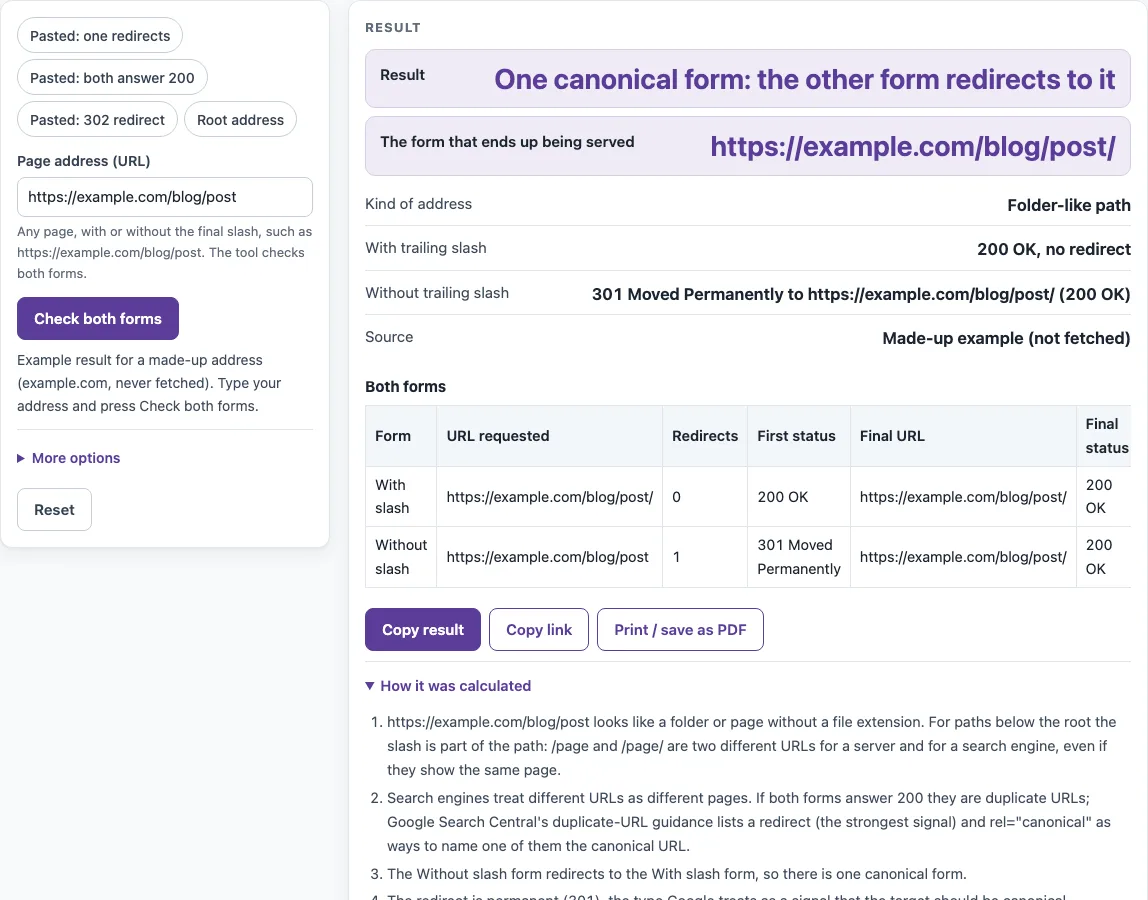
- Read the Result row. It gives the verdict, and the The form that ends up being served row names the form visitors actually land on.
- Check the Kind of address row (Root (host only), File-like path or Folder-like path), then compare the Both forms table. Look at Redirects, First status and Final status for each form.
- If you need the raw responses, open More options and copy the curl -sIL output for the form WITH the slash or WITHOUT the slash. You can run these commands yourself, offline.
The page also offers four presets: Pasted: one redirects, Pasted: both answer 200, Pasted: 302 redirect and Root address. The page opens with a made-up example for example.com, which is not fetched.
A check of a URL below the root uses two of the 10 checks a minute, one for each form. The Both forms table shows each form’s first status, number of redirects and final address side by side, so you can see at a glance whether the two end on the same page.
What is a trailing slash?
A trailing slash is the “/” at the end of a URL path. In /blog/ the slash is trailing, and /blog is the same path without it. The two are different addresses, even though a server may show the same content for both.
The root of a site is the exception. For https://example.com there is no difference, because a client always sends “/” as the path when the path is empty. RFC 9112 section 3.2.1 says the client MUST send “/”, and RFC 9110 section 4.2.3 says an empty path is equivalent to “/”. The tool therefore makes one request for a root address.
Does a trailing slash matter for SEO?
It can. Below the root, /page and /page/ are different URLs for servers and search engines, even when they show the same page. If both forms answer 200 without redirecting, you have duplicate URLs, and search engines must choose one of them.
Google’s “Consolidate duplicate URLs” documentation lists three methods, in order of strength: redirects, which it calls “a strong signal that the target of the redirect should become canonical”, rel=“canonical”, which it calls “a strong signal”, and sitemaps, which are a weak signal. That documentation does not mention trailing slashes, so the rule here is general guidance applied to that list. A 301 or 308 redirect is a canonical signal. A 302, 303 or 307 redirect is not.
The fix is to pick one form, redirect the other with 301 or 308, and use the chosen form consistently in internal links, your sitemap and rel=“canonical”. Google does not say which form is better, so the tool shows whichever form is served and does not claim a preference. Consistency is what matters.
Sources (checked 13 October 2026): RFC 9110 · RFC 9112 · Google Search Central
Worked examples
| Input | Result |
|---|---|
| https://example.com/blog/post | One canonical form: the other form redirects to it |
| https://example.com/ | Press Check both forms to request both addresses, or paste curl output in More options. |
| https://example.com/blog/post/ | Duplicate URLs: both forms answer without redirecting |
| https://example.com/docs/page.html | Press Check both forms to request both addresses, or paste curl output in More options. |
Calculated by the tool above; open it with the same values to see each step.
Frequently asked questions
Does https://example.com need a slash?
No. https://example.com and https://example.com/ are the same request, because the empty path is sent as “/”. The tool checks a root address once, not twice.
Should I use 301 or 302 for the slash redirect?
Use 301 or 308. These are permanent redirects, which count as a canonical signal. A 302 is temporary and is not a canonical signal, so the tool shows a warning: “The redirect is temporary (302)” and suggests 301 or 308 for a permanent choice.
How do I check which form my server uses?
Enter the address, press Check both forms, and read The form that ends up being served. If you see a 301 or 308 from one form to the other, your server already uses the form it redirects to.
What about URLs like /page.html?
Files are normally served without a trailing slash, so /page.html/ usually returns 404, which is fine. The tool marks an address as file-like when its last path segment ends in an extension of 1 to 8 characters that contains a letter, such as .html. A segment like “.2” does not count.
Does Google prefer slash or no slash?
Google’s documentation does not say. Choose one form and use it everywhere, then redirect the other form to it.
What if one form returns 404?
The tool gives a warning and advises redirecting that form only if it is actually used. If nobody links to it or requests it, a 404 is not a problem.
Related tools
- Redirect checker: use it to see the full redirect chain and status codes for a single address.
- Bulk redirect checker: use it when you have a list of addresses to check for redirects.
- Broken link checker: use it to find links that point to pages returning errors.
- Canonical tag checker: use it to check the rel=“canonical” tag on a page after you have chosen one form.
- Noindex checker: use it to check whether a page carries a noindex instruction.
- Sitemap finder: use it to locate the sitemap that should list only your chosen form.