XML Sitemap Generator
Paste your page URLs to get a valid sitemap.xml file, or several files and an index.
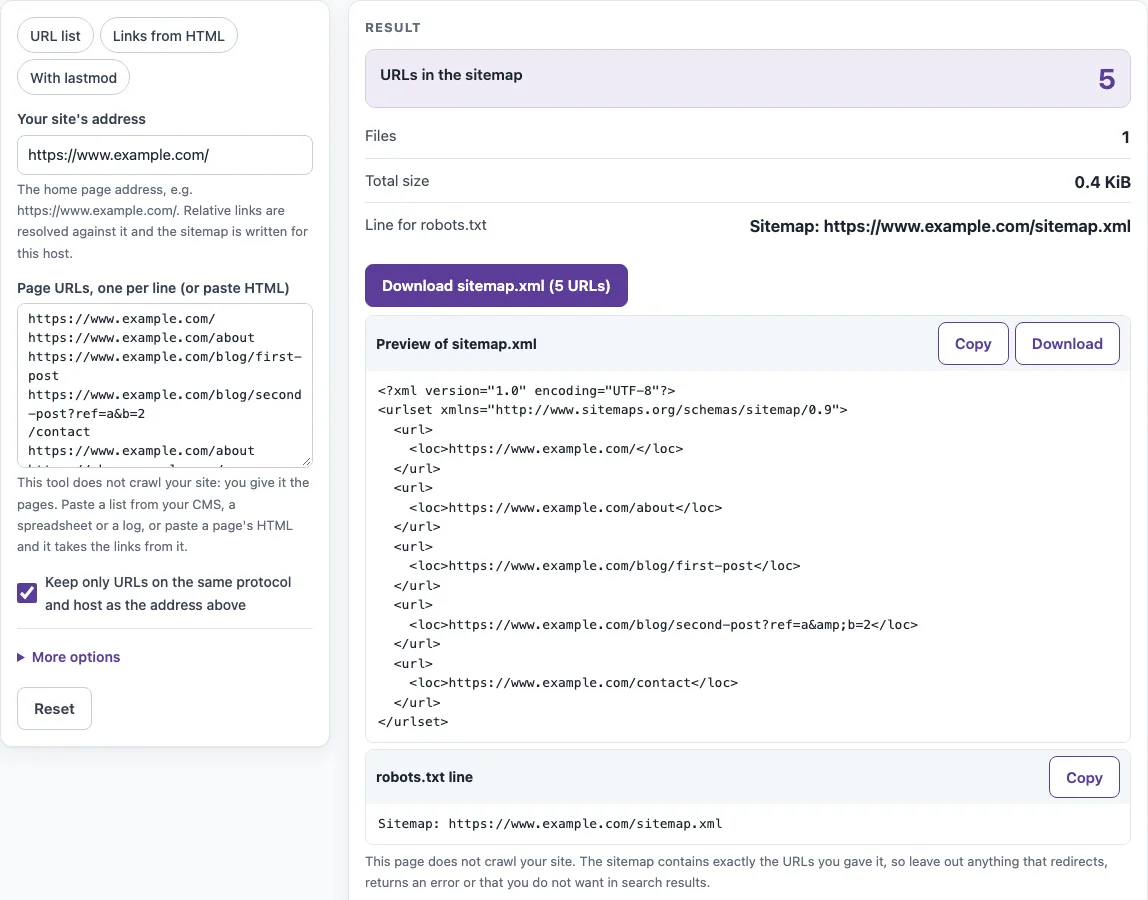
How to use the XML sitemap generator
- Type your site’s address into “Your site’s address”, including the protocol, such as https://www.example.com.
- Paste your URLs into “Page URLs, one per line (or paste HTML)”. Put one URL per line, or paste the HTML of a page and the tool takes the href of every link in it. Relative paths such as /contact are resolved against your site’s address.
- Optionally, choose a preset: “URL list”, “Links from HTML” or “With lastmod”.
- Open “More options” to set lastmod for every URL (optional), changefreq (optional) or priority (optional). Leave them blank if you do not need them.
- Read the result rows: “URLs in the sitemap”, “Files” and “Total size”. Then check the “Left out” table, which lists each skipped entry and the reason it was skipped.
- Click the download button for your file, such as “Download sitemap.xml (5 URLs)”.
- Copy the “Line for robots.txt” value so you can add it to your robots.txt file.
The “Links from HTML” preset is useful when a page, such as a site map page, already links to everything you want listed. For lists above 50,000 URLs, the tool also gives you sitemap-1.xml, sitemap-2.xml and so on, plus a sitemap.xml index. Download every file and upload them all to your site root.
How do I create an XML sitemap?
Create one by listing the full address of each page you want search engines to know about, wrapping the list in the XML structure defined by the sitemaps.org protocol, and saving the result as sitemap.xml. Each page sits in a url element, and its address goes in a loc element inside it. The urlset element declares the namespace that holds the file together.
The file starts with an XML declaration that sets UTF-8 encoding, which is the encoding the tool writes. The protocol also sets a few rules. All URLs in one file must come from a single host, and each loc value must be shorter than 2,048 characters. Google asks for fully-qualified absolute URLs, so /contact on its own is not enough. The tool resolves it against your site’s address first.
A sitemap lists the URLs you want crawled. It is a hint, not a guarantee of indexing. For that reason, list only canonical, indexable URLs that return a 200 status. The tool cannot check status codes, so that check is yours to make before you paste the list.
Placement matters too. Under the sitemaps.org protocol, a sitemap file may only list URLs in the folder it sits in and below, so a file at /blog/sitemap.xml cannot list /shop/ pages. Placing sitemap.xml at the site root avoids that limit.
What date format for lastmod?
Use a W3C date. You can write the date alone, such as 2026-10-13, or a full timestamp with a time zone, such as 2026-10-13T08:30:00+00:00. The tool returns an error for any lastmod value that is not a W3C date, and it shows a warning when the same lastmod is applied to every URL.
Google uses lastmod only when it is consistently and verifiably accurate. Set it for each page only when your system stores a real last-modified date. If you apply one date to the whole list, the value tells search engines very little, so leave the field empty instead.
Sources (checked 13 October 2026): RFC 9309 · sitemaps.org · Google Search Central
Worked examples
| Input | Result |
|---|---|
| https://www.example.com/, URL list | 5 URLs in 1 file(s) |
| https://www.example.com/, HTML | 2 URLs in 1 file(s) |
| https://www.example.com/, URL list | 2 URLs in 1 file(s) |
Calculated by the tool above; open it with the same values to see each step.
Frequently asked questions
Does this crawl my site?
No. The tool does not crawl your site or fetch its pages. It writes a sitemap from the URLs you give it. It may remove some entries, such as duplicates, fragments and URLs on another host or protocol, and it lists those in the “Left out” table.
How many URLs can a sitemap have?
One file can hold at most 50,000 URLs and 52,428,800 bytes (50 MB) uncompressed. If your list is larger, the tool writes sitemap-1.xml, sitemap-2.xml and so on, plus a sitemap.xml index that lists them. For example, 50,001 URLs produce two files and the index.
Do I need priority and changefreq?
No. Both are optional in the sitemaps.org protocol, and Google ignores their values, so you can leave them blank under “More options”. If you use priority, it must be between 0.0 and 1.0, and it defaults to 0.5. If you use changefreq, it must be always, hourly, daily, weekly, monthly, yearly or never.
What about special characters in URLs?
The tool escapes the characters that XML treats as special. The ampersand (&) becomes &, < becomes <, > becomes >, " becomes " and ’ becomes '. Non-ASCII characters and spaces are percent-encoded as UTF-8, so é becomes %C3%A9 and a space becomes %20. You do not need to escape anything yourself.
Where do I submit it?
Put the file at your site root and add a Sitemap line to robots.txt. RFC 9309 allows this, and the tool gives you the exact line as “Line for robots.txt”. You can also submit the file through the site owner tools of the search engines you use.
Is the output valid?
Yes. The tool’s output validates against the sitemap validator on this site, and the tool’s tests check that. Validation confirms the file’s structure, not that the URLs in it are correct, so review your list before you upload it.
Related tools
- Broken link checker: use it to find links on your pages that lead to errors before you add those pages to a sitemap.
- Internal link checker: use it to review the links between your own pages, which often shows which URLs are worth listing.
- Redirect checker: use it to see where a URL redirects before you decide whether to list it.
- Bulk redirect checker: use it when you have many URLs to check for redirects at once.
- Meta tag checker: use it to review the meta tags on the pages you plan to list.
- Canonical tag checker: use it to confirm each URL points to its own canonical version before you include it.